


Thunderbid write toolbar missing

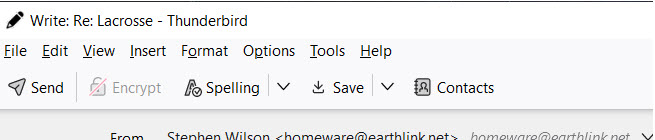
When I attempt to write/ reply/ reply all/ forward, the toolbar at top shows only the slanted pen symbol and "Write -- nothing below. So no "Send" button. The full toolbar that I am trying to recover is attached which I copied from a second computer. When I write click that "Write" bar at the top, noting in the drop down menu had any effect. Help/About says I am "up to date" running 153.1.0esr (64 bit)
所有回复 (10)

In a Write window: View - Toolbars Check 'Composition Toolbar' (this is the toolbar with the Send button).
Thanks christ1 for such a prompt reply. Unfortunately, "View" is one of the missing options. In the image accompanying, all I see is the first "line" -- the "Write Re: Lacrosse - Thunderbird" in this example.
Maybe this; "About" says my version is up-to-date. Is it possible nevertheless to force a download in spite of up-to-date? Something I should first kill in order to do that?

perhaps it's no coincedence s.c. wilson, but the person i'm supporting reported exactly the same problem, it started to happen last monday (17th august) - i.e missing toolbar that includes 'view' 'file' etc.
she's also running 153.1.Oesr - but 32 bit - i'm searching for an explanation and fix
由ruthtoby于修改

This may be the solution:
If both the Menu Bar and the Composition Toolbar are hidden (collapsed) you see what Stephen describes and there is no obvious way to get them back, there is nothing to right-click.
To get them back press the left Alt key on your keyboard, the Menu Bar should now appear, right-click it and check it in the popup menu to make it stick, you can now right-click the Menu Bar and also check the Composition Toolbar in the popup.
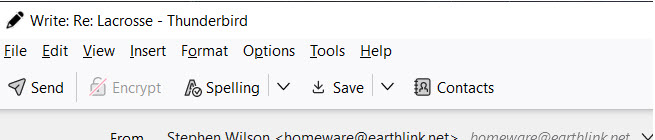
"View" is one of the missing options. In the image accompanying, all I see is the first "line" -- the "Write Re: Lacrosse - Thunderbird" in this example.
As per your screenshot, the menu bar is right below the first "line" you mentioned above. And it has a 'View' menu item.
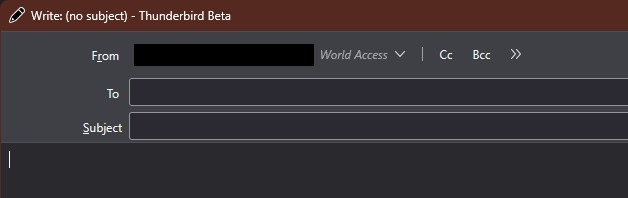
The text + screenshot is a bit confusing, what he sees is likely something like this:
由dillenger于修改
dillenger Yes, that's all I see
dillenger Nothing works. When I press the left Alt key, nothing pops up.
Hmm, weird, when pressing the left Alt key in a composition (Write:) window the Menu Bar (with File, Edit, View etc.) should reappear.
huge thank you @dillenger - it worked for me and the person i'm supporting - we both have thunderbird release 153.1 running on a windows lap top, by using the left alt key I was able to toggle the display of both the menu toolbar and the composition toolbar.
i also tried it on my ubuntu linux desk top, thunderbird version 154.0 (64-bit), but it only toggled the composition toolbar, not the menu toolbar
由ruthtoby于修改