Book marks between android and Web not visible on same profile

I have now tried every fix available that I have found online and none of them match what I am experiencing. If I am browsing on my phone and want to save it as a book mark i am unable to choose where to save it under my bookmarks. It just says save to bookmarks. Now i try and find that bookmark on my laptop but to no avail. The Mozilla bookmarks are terrible and unfortunately to say here EDGE kicks Mozillas butt. Both Laptop and Phone are on my only profile. I then also found that the search history is limited and wont show all history. Tried all fixes on web. Not one works. May have to revert to EDGE.
所有回复 (1)
Hi Vincent,
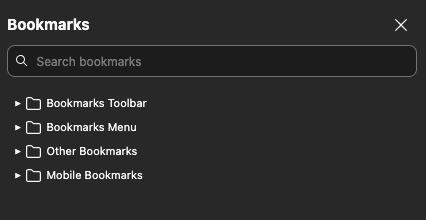
Bookmarks from Firefox for Android is stored under a dedicated mobile folder. Please check out the attached screenshot to see how the bookmark folders are structured on my side.
You may want to check out the following articles to learn more about bookmark management on Firefox for Android:
- Manage bookmark folders in Firefox for Android
- Add, delete and view bookmarked webpages in Firefox for Android
Hope that helps!