


Windows 10 已于2025年10月14日停止支持。如果您正在使用 Windows 10,参见 这篇文章

Windows 10 reached EOS (end of support) on October 14, 2025. If you are on Windows 10, see this article.

搜索 | 用户支持

防范以用户支持为名的诈骗。我们绝对不会要求您拨打电话或发送短信,及提供任何个人信息。请使用“举报滥用”选项报告涉及违规的行为。

详细了解

I deleted an email account ***@gmail.com I am no longer authorized to use. I persistently receive Google "Verification" screens for that email account. These only appear if I have thunderbird running.

  • 1 个回答
  • 1 人有此问题
  • 45 次查看
  • 最后回复者为 david
  • Open

Every time I start up Thunderbird, I receive a "Please verify" message from Google (see screen shot). This message refers to an email account that I deleted because I am no longer authorized to use it ["s***@old****.com]. These requests also turn up regularly if I remain connected. I cannot verify the account because the password has been changed and the verification email is no longer mine.

I have 2 other accounts on Thunderbird; one is linked to a private domain; one is an ***@gmail.com account. Both perform correctly; are configured correctly and cause no problems with passwords, etc.. Other evidence:

In Box: The s***@old****.com account is not present in the left menu window. When I go to Accounts, Settings: The s***@old****.com account is not listed. When I go to Server Settings (In or Out) there is no trace of the 's***@old****.com' account, although the other two accounts have correct settings in the 'Outgoing' server.. Previosly, this email "s***@old****.com" was also linked to my Google Account. I have deleted it from my Google Account; I have deleted it from Thunderbird as an Account. When I disconnect my Google Accounts: This has no apparent effect on frequency of Verification prompts [I close my Safari browser]. When I Close Thunderbird: The Verification prompts for "s***@old****.com" no longer appear.

It seems like Thunderbird is still trying to "Get Messages" from "s***@old****.com" and triggering the Google password protection system (?).

IS THERE A WAY TO FIX THIS IN THUNDERBIRD?

Thanks, Al
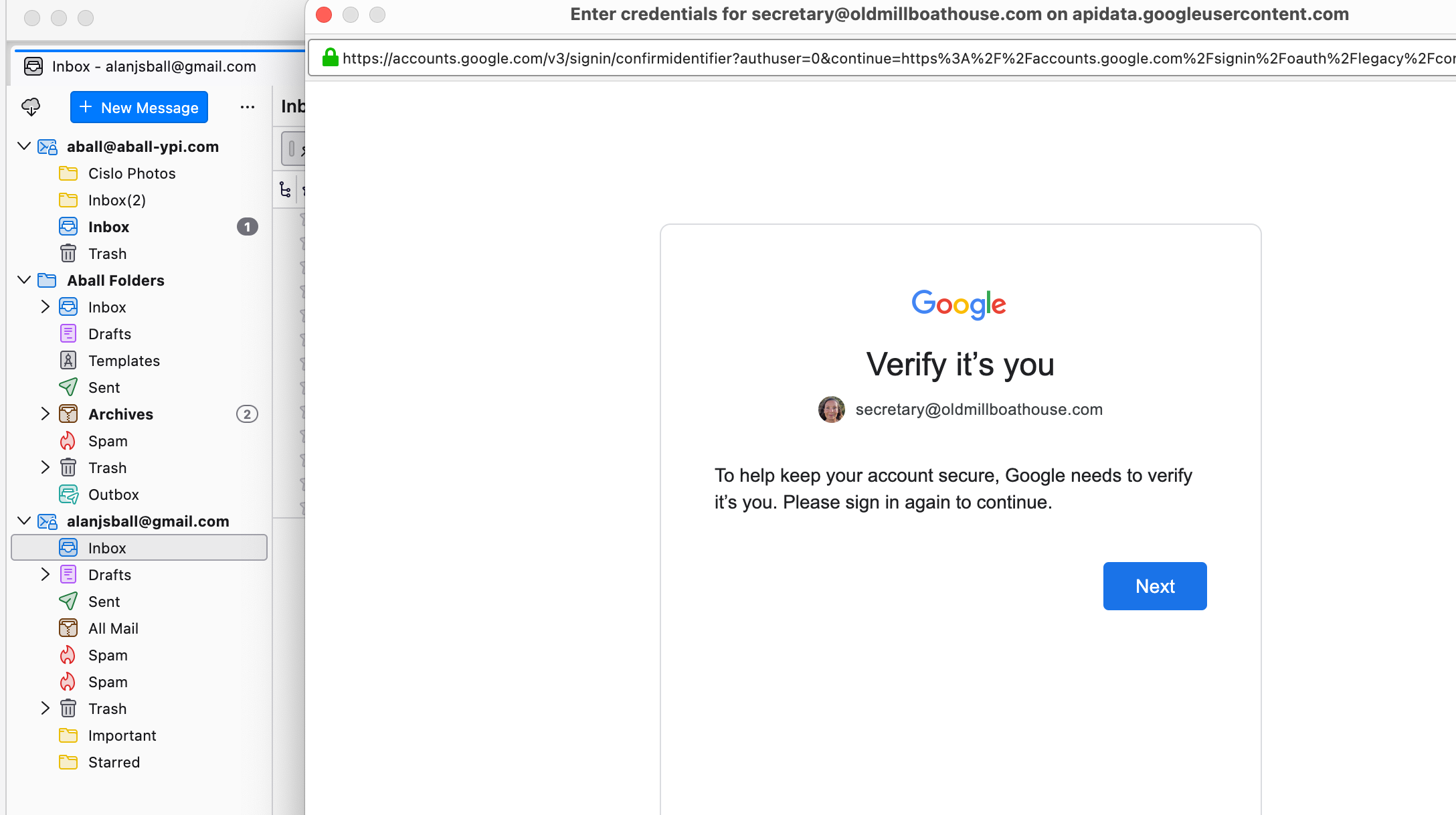
Every time I start up Thunderbird, I receive a "Please verify" message from Google (see screen shot). This message refers to an email account that I deleted because I am no longer authorized to use it ["s***@old****.com]. These requests also turn up regularly if I remain connected. I cannot verify the account because the password has been changed and the verification email is no longer mine. I have 2 other accounts on Thunderbird; one is linked to a private domain; one is an ***@gmail.com account. Both perform correctly; are configured correctly and cause no problems with passwords, etc.. Other evidence: In Box: The s***@old****.com account is not present in the left menu window. When I go to Accounts, Settings: The s***@old****.com account is not listed. When I go to Server Settings (In or Out) there is no trace of the 's***@old****.com' account, although the other two accounts have correct settings in the 'Outgoing' server.. Previosly, this email "s***@old****.com" was also linked to my Google Account. I have deleted it from my Google Account; I have deleted it from Thunderbird as an Account. When I disconnect my Google Accounts: This has no apparent effect on frequency of Verification prompts [I close my Safari browser]. When I Close Thunderbird: The Verification prompts for "s***@old****.com" no longer appear. It seems like Thunderbird is still trying to "Get Messages" from "s***@old****.com" and triggering the Google password protection system (?). IS THERE A WAY TO FIX THIS IN THUNDERBIRD? Thanks, Al
已附加屏幕截图

所有回复 (1)

This situation usually happens when there was a related gmail calendar for the account. I suggest checking for that.

我要提问

您需要登录才能回复。如果您还没账号,可以提出新问题