


Having problems downloading 9 months of e-mail

My computer has not worked for nine months.
I've been looking at my e-mail on my phone (not in Thunderbird for Android, which pretended to send my messages but didn't). I want it on my computer.
I didn't want to do that right away, but it looks like Thunderbird started doing that automatically when I launched it. It successfully got my small account, of course, but not my big one.
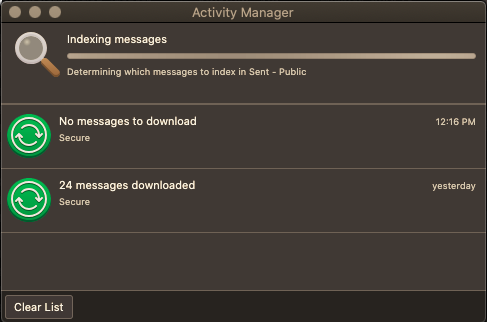
It's been stuck on this for more than 12 hours. (See image. My apologies, I've forgotten how to embed them.)
Is it safe to shut the process down? Whether it is or isn't, what do I do next?
My computer is a MacBook Pro (13-inch, Mid 2012), running OS X.15 (Catalina), with Thunderbird 140.0.1esr (64-bit). The process started before I could upgrade to 149esr.
Thank you for any help you can give me!
UPDATE, 4/11, 8PM EDT: No change. . . .
由khindall于修改
所有回复 (6)

I'm not sure I understand the situation. Let me paraphrase - let me know if I have this wrong...
You have Thunderbird installed on a computer but you haven't launched Thunderbird for 9 months. You have now started it after that long recess but now it seems hung up on retrieving messages. It appears that the folder indexing process is what's stuck. Correct? Is Thunderbird otherwise responsive?
The indexing process can, indeed, take a lot of time, but 12 hours is not normal. Although not ideal, at this point I think you have to kill the process. Folder indexes can become corrupt and could possibly lead to symptoms like this. However, if necessary, an index can be deleted and will rebuild itself as needed.
Some information that might help us: Is this an IMAP or a POP3 account? Who is your email provider?
Don't try to upgrade Thunderbird until your installed version is working correctly.
My computer was nonfunctional and I couldn't pay to have it fixed. So I subsisted on a smartphone.
My computer is functional. Now all the e-mail that I received is sitting on the server, and I want it on my computer because I loathe smartphones.
I just checked and it's POP3. It's my sister's domain, and her hosting company keeps getting swallowed by other hosting companies, and I'm not sure who they are now.
Thunderbird seems fairly responsive. I haven't tried much because of the weirdness with the indexing. I did just access my account settings in it, to see if it was IMAP or POP3.
Does that answer everything? Should I still kill it?
Thank you!
K
I just looked at your topic for your Thunderbird for android. I do not use it, but I find the whole concept of "pretending" to send mail to be a concept I can not swallow. I would be far more agreeable if the mail was not getting delivered. There are many causes of send mail not arriving. I am not aware of a single instance of a send failure not reporting an error. But then do desktop because I really don't trust the phone operating system for much more than I have to and the Phone version is based on another code base to the desktop version, so I sort of question if it can be called the same product, about the only thing they share is the name. However I am unable to find any credible reports of silent failures to send mail. Did you really not get anything in your android notifications? Perhaps post the source headers from the sent folder as they will contain some diagnostic information.
As for this latest issue, I think we really need to be looking as the hosting provider. What is the domain part of the email? It should not be hard to work out who hosts the domain and from there we may well find you are using the Microsoft exchange product (proprietary protocols) and that would largely explain both your phone issues and this.
As for the indexing issue, you can kill Thunderbird while indexing is occurring, as a matter of fact in this instance I suggest you delete the index and force it to start again. See https://support.mozilla.org/en-US/kb/rebuilding-global-database
Do you have an antivirus on that apple product? They cause numerable issues with their processing and removal while diagnosing issues is a very good idea..
So, this is the same computer that was formerly "nonfunctional" but is now functional? Or is this a different computer with a fresh installation of Thunderbird on it?
I'm guessing you had it set up as a POP3 account using the option to '"Leave messages on server." This setting ensures that emails are not automatically deleted from the server after being downloaded. But I wonder if Thunderbird is now confused and doesn't know what was formerly downloaded and what wasn't. (This is a weakness of POP3 - it's fragile - and why I prefer IMAP.)
Yes, I think killing it is your only option at this point. But before you restart Thunderbird you should make a backup copy of your Profile, in case something goes wrong. In Thunderbird, go to the menu option:
Help -> Troubleshooting Information -> Open Folder
to open your Profile folder. Go up one level to the Profile's containing folder. Now close down Thunderbird and copy the Profile folder to somewhere safe. (It's good practice to make regular backups of that folder, especially in the case of POP3 accounts where the only copy of your old messages is likely to be on your local computer.)
I'm hoping that when you next start Thunderbird it will successfully download waiting messages and do its indexing chore and you'll be back to normal. In other words, the hangup was 'just one of them crazy computer things.'
Please let me know how it goes, and if not resolved we can take it from there.
I am getting nowhere. I turned off my virus software, but the indexing is still freezing.
It now knows there are 1756 messages, but the indexing freezes early on. The furthest I have reached is 20 messages. If I quit, there is an error message saying Thunderbird quit unexpectedly.
There is a feature on my phone's e-mail client that specifically allows me to make an mbox file that is importable into Thunderbird. In fact it specifically mentions Thunderbird. Should I do that instead?
Thank you!
@Matt, I am not sure you'll see this response, but I am trying it.
I am happy with FairEmail on my phone and have paid for it. Support for Mozilla products on Android is virtually nonexistent; it was months before I got a response to the e-mail question, by which time I had solved it with a different e-mail client so I did not pursue it. I have had similar problems with support for Firefox for Android, although the problems are not as devastating. I do continue to use Firefox for Android.
Thanks for the suggestion about my virus software (Avast Security), which I did turn off after I read your post. Sadly, it didn't seem to help, but I should've thought of that before posting.