


Importing CSV address books does not work properly.

Importing CSV address books does not work properly. The resulting folder cannot be accessed by emails to be sent.
The imported Address Lists cannot be used in an email as a list. The error message is that the address is not a valid email address. However, if a new Address List is created with the contents of the imported file manually copied, then it can be used as an email address.
I also found that clicking on an individual address in the imported csv, will open the individual email address.
So the addresses are valid but the list is corrupted.
所有回复 (5)
This process has not been changed for many years, so there may be an issue with your import. Did you see a mapping screen when the import began? If you repeat the process, if you see the mapping screen, creating a screenshot may prove helpful. This prior post may prove helpful: https://support.mozilla.org/en-US/questions/1569866
There was no mapping screen. The CSV imported was from previous Thunderbird installed on my Win 10 Laptop and exported. So the databases are exactly the same.
I can see the names in the imported lists. I can even click on individual and edit them or write to them. It is the whole list that TB does not recognize as a valid email address.
I have many lists with many names. Manually copying them is possible but time consuming. This should not be necessary from a list exported from the same program. When right clicking on the list I cannot edit the list. I attach the screen shot of the R click popup.
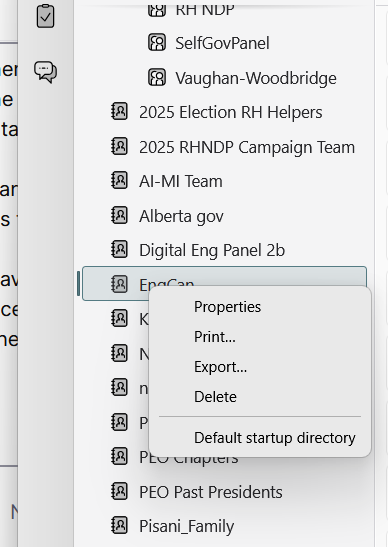
You have imported an address book, not a mailing list. Perhaps create a mailing list using your imported book. Clearly you already have some as they appear in the image you posted.
Note this part well. Thunderbird creates lists by linking to book entries. Historically it added whole records for contacts to the list separate from the address book entry. That has not been the case now for some years, so you can not import a CSV mailing list.
Thanks Matt, Your response begs the question - how do I export my mail lists so I can import them into a different installation of TB? I have gone from Win 7 to Win 10 to Win 11. I would like to preserve the Mail Lists. Is there a way to do this without re-entering all the contacts?
Thanks
I defer to Matt, but, folloiwing what he stated, you need to do this: - go to the addressbook pane and create a new addressbook - then, use the import feature for addressbooks, following suggestions posted earlier in this thread - then, create a mailing list for the addressbook contents (small icon to the right of the 'new contact' button