


Adding Outlook account -> missing folders

Hello,
I've moved last week from Microsoft Outlook from Mozilla Thunderbird on my MacBook Pro laptop for managing my e-mail accounts.
I've added an Outlook account (e-mail xxx@hotmail.com) to Thunderbird. However after using Thunderbird a few days I've discovered that some sub-folders in my private folders are missing.
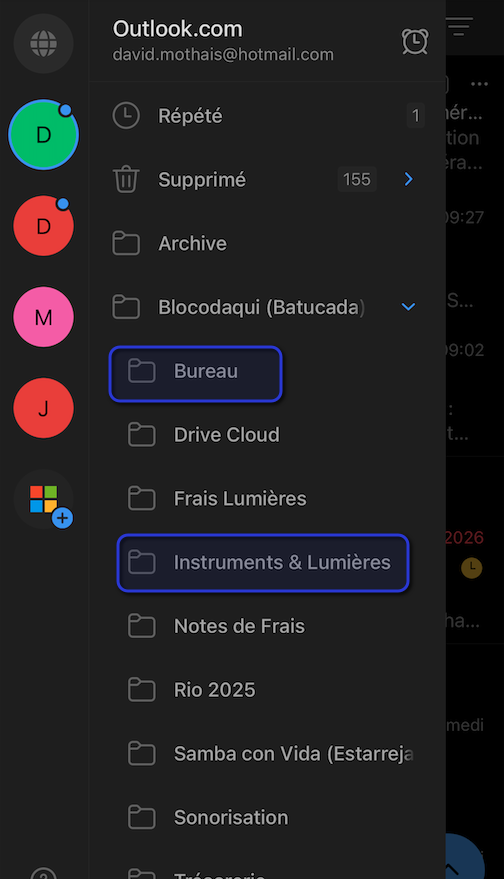
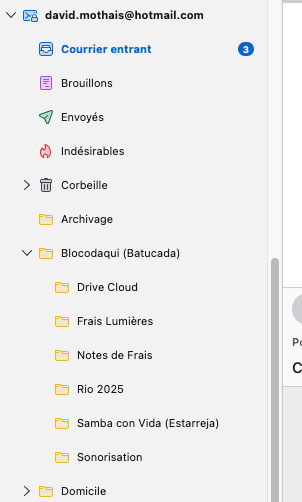
I've added in attachment an image showing my folders on my mobile phone (using Microsoft Outlook) and an image showing my folders on my laptop (using Thunderbird where both 'Bureau' and 'Instruments & Lumières' are missing).
Thank you in advance for your help.
Best regards, David
所有回复 (1)
Daily I am annoyed with this problem. Even thinking about another solution than Thunderbird for handling my e-mail address. It would be a pity...
Indead, I've look for this topic on internet. And many times for similar topic, it relates to IMAP settings with Outlook.
Thus I provide here (see attached image) my settings for my Outlook account. Maybe you would see something wrong in it ?!
