


Menu suddenly Very Wrong on mobile; how to return it to normal?

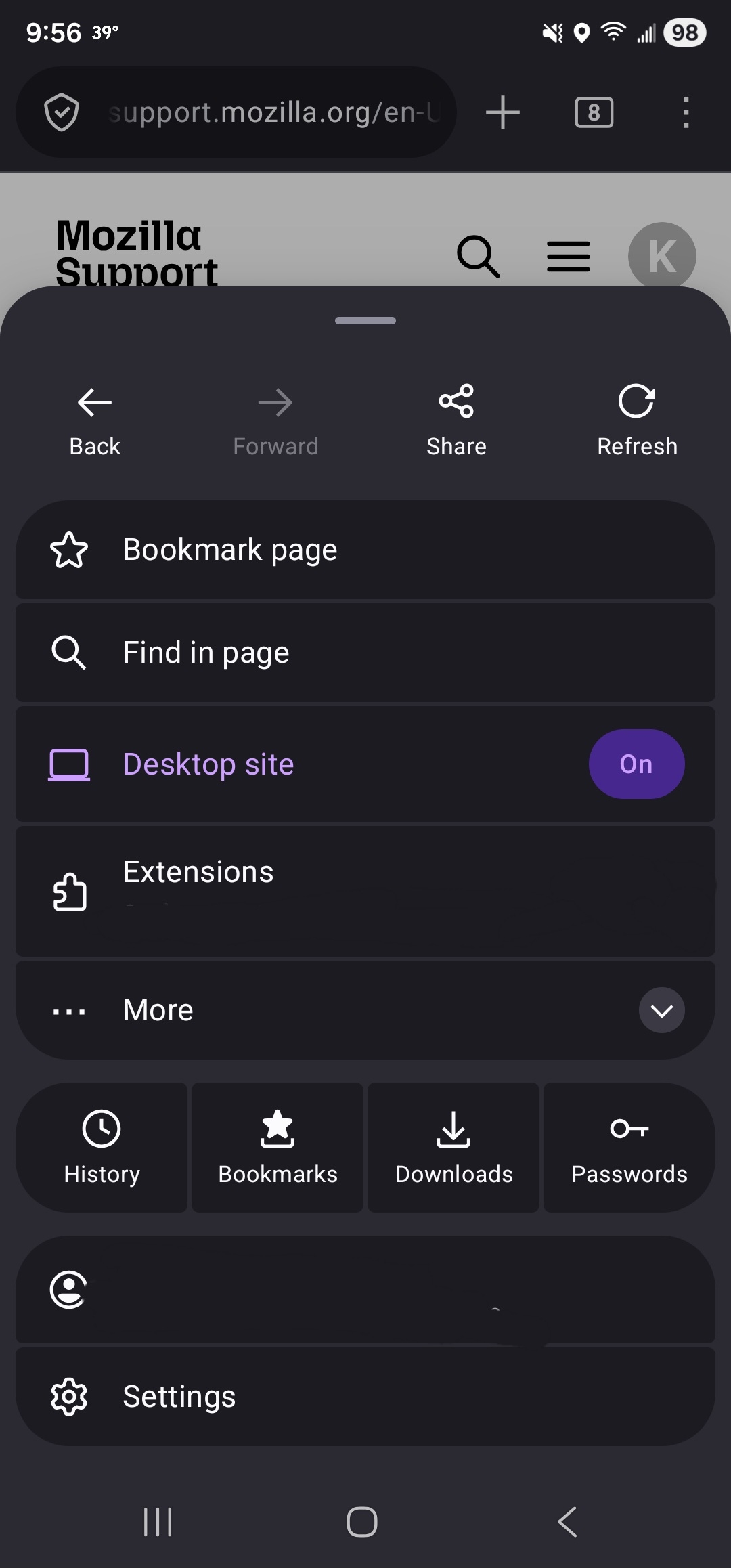
I have an issue in that, upon pressing the three-dot menu button on mobile, the browser menu is suddenly popping up from the bottom of the screen instead of sliding in from the side like it's supposed to, as well as what used to be a nice and neat list of options now being a cluster of hard-to-make-out icons and buttons. I didn't change anything in the settings to make it do this (I very specifically selected the "top" display option when I first downloaded Firefox months ago and haven't touched it since), and I've already checked reddit to see if anyone else is having this problem and if so, how to return my menu's behavior and appearance to normal (no luck).
I unfortunately have no images of what my menu is supposed to look like as it never occurred to me something like this could happen, but I can at least provide a screenshot of the ugly way it looks now (notice the little bar at the top of it that suggests I'd be able to "drag" it back to its correct placement? Yeah, it doesn't do anything, no matter how long I hold my finger on it.) PLEASE tell me what can be done to undo this awful change and return my menu to normal!
所有回复 (1)
Hi Kerisugi,
We've introduced a new UI on Firefox for Android just recently. It may take some time to get used to it. But in any case, to share feedback with the team, you may want to post in this thread in the Mozilla Connect platform.