


Windows 10 reached EOS (end of support) on October 14, 2025. For more information, see this article.

搜索 | 用户支持

防范以用户支持为名的诈骗。我们绝对不会要求您拨打电话或发送短信,及提供任何个人信息。请使用“举报滥用”选项报告涉及违规的行为。

详细了解

Not being prompted to upgrade Thunderbird !!

  • 无回复
  • 0 人有此问题

When there is an update available for Thunderbird, I no longer get the prompt window automatically opening to tell me.

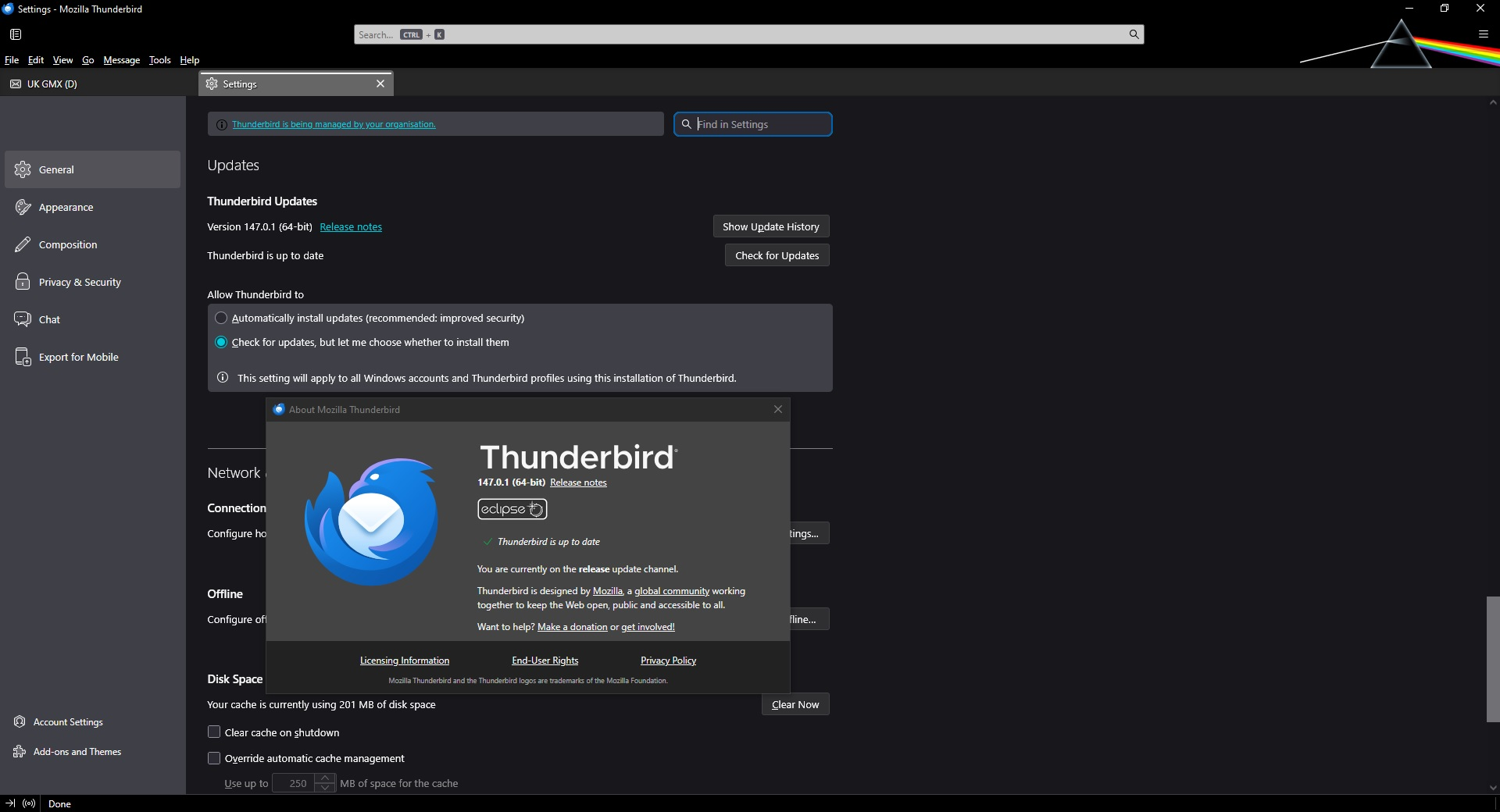
I have my Settings, General, Updates set to Check for updates, but let me choose whether to install them. (see attached screenshot)

This worked in the past but after an update (can't remember which one), this stopped working.

I have my Update Settings set in Firefox to the exact same and it always automatically opens a prompt window when there is an update due, as does all my other software, so is there something set differently in my Firefox settings compared to my Thunderbird settings?

Is there something in the Firefox about:config settings that is possibly switched on but it is not switched on in Thunderbird about:config settings that is preventing Thunderbird automatically opening an update window?

Is there something different in the registry entries or values in a file?

I know that I can manually select Help, About Thunderbird and the prompt window will show any updates available but we don't always remember to check and that's why the automatic prompt works so well!

I am running Thunderbird Version 147.0.1 (64-bit) currently on the release update channel.

Any suggestions would be helpful.

Thanks.
When there is an update available for Thunderbird, I no longer get the prompt window automatically opening to tell me. I have my Settings, General, Updates set to Check for updates, but let me choose whether to install them. (see attached screenshot) This worked in the past but after an update (can't remember which one), this stopped working. I have my Update Settings set in Firefox to the exact same and it always automatically opens a prompt window when there is an update due, as does all my other software, so is there something set differently in my Firefox settings compared to my Thunderbird settings? Is there something in the Firefox about:config settings that is possibly switched on but it is not switched on in Thunderbird about:config settings that is preventing Thunderbird automatically opening an update window? Is there something different in the registry entries or values in a file? I know that I can manually select Help, About Thunderbird and the prompt window will show any updates available but we don't always remember to check and that's why the automatic prompt works so well! I am running Thunderbird Version 147.0.1 (64-bit) currently on the release update channel. Any suggestions would be helpful. Thanks.
已附加屏幕截图

您需要登录才能回复。如果您还没账号,可以提出新问题