


"Reply with Template" always uses encryption, resulting in corrupted e-mail reply

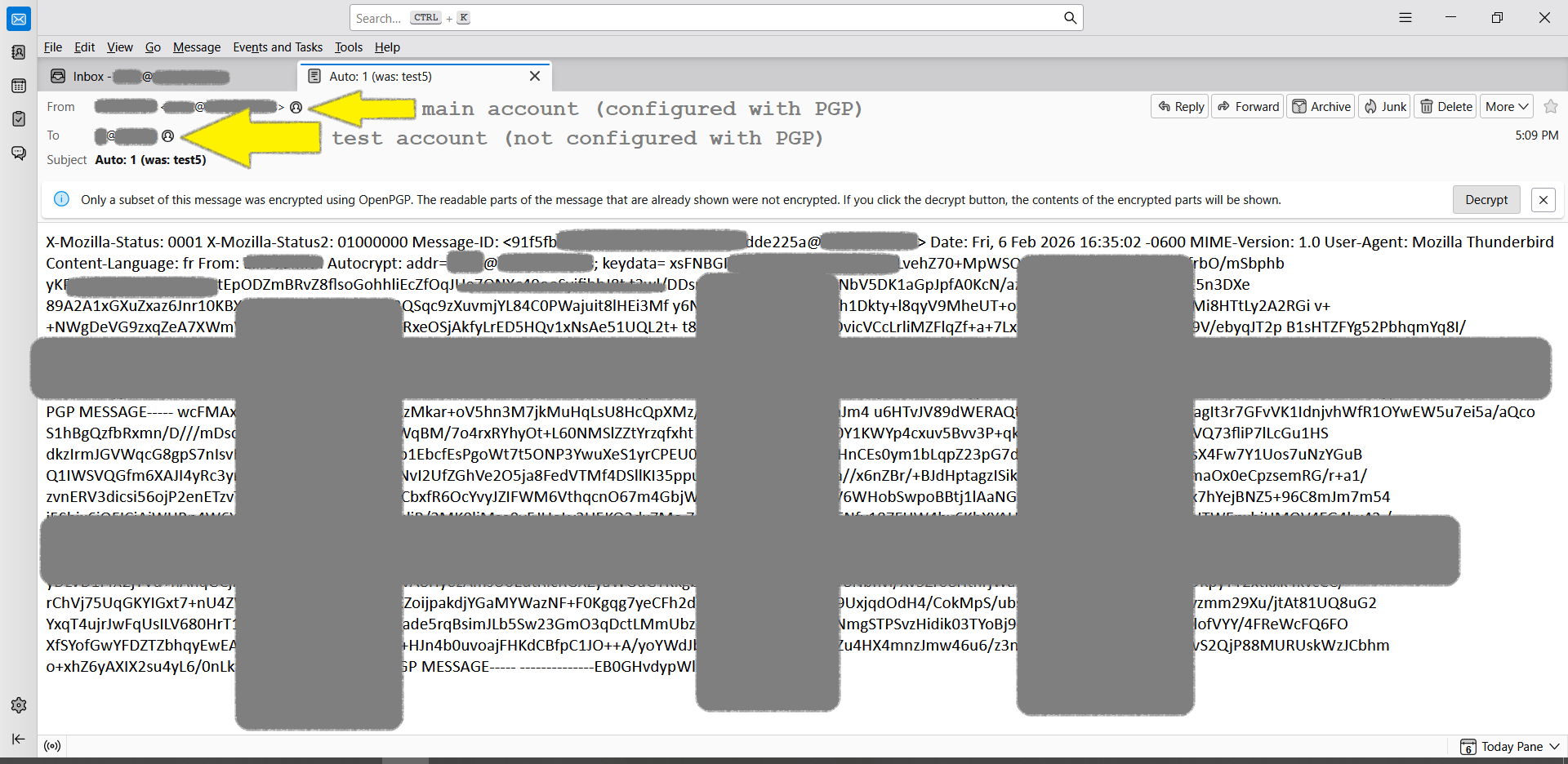
When my message filter uses the "Reply with Template" action, the reply e-mail is always PGP encrypted, even when I do not have any public key for the recipient e-mail address. As a result, the reply e-mail is always corrupted.
I am using Thunderbird 140.7.1esr on Windows 10.
I have attached a screenshot of what the reply e-mail always looks like.
In the Template that I am using, the "encrypt" button is not selected, and in the OpenPGP menu of the Template, the "Encrypt" menu item does not have a checkmark next to it.
Does anyone know how I can get Thunderbird to send reply e-mails without using encryption?
所有回复 (6)
Thanks, this is a good suggestion, however, I checked, and "Automatically enable encryption when possible" was already disabled.
Out of curiosity, just now I went ahead and enabled "Automatically enable encryption when possible" which then allowed me to also enable "Automatically disable encryption when recipients change and encryption is no longer possible." In theory this might help disable the encryption, because after all, encryption to the recipient in this case is not possible because Thunderbird does not have a PGP key for this recipient. However, no joy, upon testing with these new settings, Thunderbird is still encrypting the message, somehow.
Also, it should be noted, although the message is encrypted, it can't be decrypted, presumably because there was no valid key against which to encrypted it in the first place. Clicking the "Decrypt" button has no effect on the displayed message.
antifascist said
In the Template that I am using, the "encrypt" button is not selected </blockquote>
I'm sorry, I must correct my original description here. It turns out that I was confused by Mozilla's awful user interface design which misled me into believing that opening the template would actually open the template, but instead it turns out that opening the template actually opens a portal to some alternate dimension in which opening the template actually instantiates a new e-mail object from the template...
It turns out that when I choose the menu option for "Edit Template" I then discover that the template has the "Encrypt" button selected, and the "Encrypt" button can not be deselected. Well, it can be deselected, but saving the template unfortunately does not save the deselected state of the "Encrypt" button. :-(
So, it's a bug that doesn't seem like it will have any workaround. :-( I did however file a bug report so there is a chance it might get fixed eventually https://bugzilla.mozilla.org/show_bug.cgi?id=2015226
update: I tried to manually create and send a new e-mail from my template, just to see what would happen, and what happened is that the new e-mail was created and sent without encryption, which is the expected behavior for an e-mail recipient who does not have any PGP key associated with it.
However, as reported above, when my message filter uses the "Reply with Template" action, then the new e-mail is always sent with encryption, even when the recipient has no PGP key, and so the new e-mail is therefore unreadable.
update: turns out that every Template is always saved in an encrypted state, even when the user deselects the "Encrypt" button.
I found a workaround, as follows: Create and save your Template inside a mail account that does not use encryption, and then drag and drop your Template from the Templates folder of your mail account that does not use encryption into the Templates folder of your mail account that does use encryption. This will allow for the correct functioning of the "Reply with Template" function of the Message Filter Filter Rules, in other words, the "Reply with Template" function will send unencrypted reply messages to recipients who do not employ encryption. If at any point in time you need to edit your Template, you would need to first drag and drop the Template over to a mail account that does not use encryption, perform and save the edits, and then drag it back to the encryption-using mail account in which the Template is actually used.