thunderbird on mac: how create inbox

I am using T-bird on a Mac. I set up for a gmail account. I can send emails but do not receive replies, etc. I noticed there is no mail inbox for the account. Settings appear correct. Any thoughts? Thank you.
所有回复 (5)
have you checked you apples notification area for connection errors or refusals of logins? What about Thunderbird activity monitor and error console?
The Thunderbird Activity Manager shows it downloaded a test message I sent. But I cannot find the message. There is no inbox for the gmail account and it's not in Junk or Trash or in my combined inbox.
dpauker said
There is no inbox for the gmail account and it's not in Junk or Trash or in my combined inbox.
What do you mean when you write "combined inbox"? What is selected in View > Folders > .... Do you have other accounts in addition to the Gmail account?
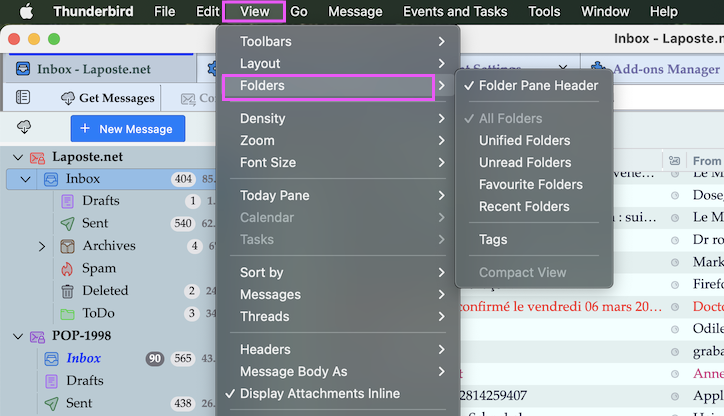
Thank you for your help. View folders is "unified folders" with a unified inbox, and each account (except the gmail account) has a separate inbox as a sub folder. The missing gmail inbox is a puzzle. I have 5 other email accounts.
Earlier, the Activity Mgr showed the download of my test message I senr to the gmail account, but I couldn't find the message. Now, I cannot find that in the Activity Mgr.
I'm on an M4 macbook pro with 24 gigs of memory. I'm wonder if I should just wipe the gmail account and start over if that would solve the problem.
Thank you, again.
dpauker said
View folders is "unified folders" with a unified inbox, and each account (except the gmail account) has a separate inbox as a sub folder.
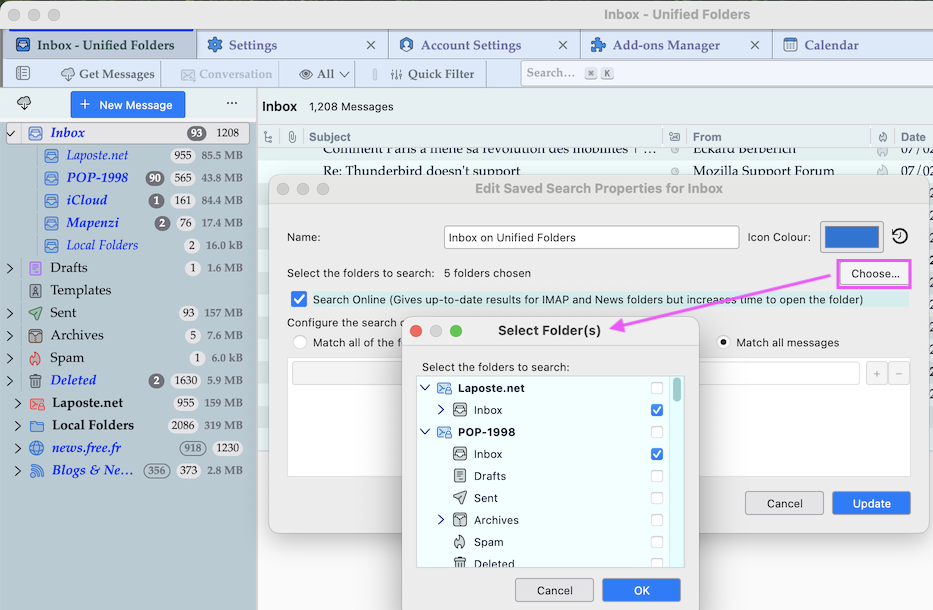
Unified Folders is important info and probably it will be easy to get your Gmail inbox back in unified folders view. • R-click on the unified Inbox folder at the top and select "Properties" in the context menu; this will open a new window called "Edit Saved Search Properties for Inbox" (see image) • click on the button "Choose" to open another window called "Select Folder(s)" which displays a list of all accounts with all folders.. • search for your missing Gmail Inbox, set a check mark, click OK and then on the Update button Now you should see your Gmail Inbox displayed in the Unified Folder view