


Deleting unwanted folder/s

Unable to delete unwanted folder visible alphabetically under inbox. I've right clicked on it and selected delete but nothing happens!
所有回复 (5)

Hi Mapenzi, I'm really sorry but I'm not tech savvy, so don't know. Do you know how to delete unwanted sub or other email folders whether it is or isn't an IMAP account please? Thank you
What is the name of the folder and does it have a special icon or just one of those yellow folder icons.
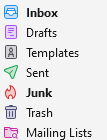
All of those are "special folders" only the last can be deleted without you changing the folder to be used for that special function in settings first and for some not even then. SO use your words and explain exactly what folder it is exactly that you want to delete and why.
Hi Matt, The ones I'm trying to delete are all the yellow icon folders, various different names, one of which is an empty 'archive' folder. Thank you
Hello, I got a text and email yesterday from Microsoft saying suspicious activity, someone else might have accessed my email account. I have repeatedly tried to log in with my password and now blocked as it says incorrect then too many attempts, try tomorrow. I have just tried again, get given a code sent to my mobile but same results, too many attempts. I have also selected 'forgotten my password' same result - too many attempts apparently. HELP! How do I recover my email account please?