


Windows 10 reached EOS (end of support) on October 14, 2025. For more information, see this article.

搜索 | 用户支持

防范以用户支持为名的诈骗。我们绝对不会要求您拨打电话或发送短信,及提供任何个人信息。请使用“举报滥用”选项报告涉及违规的行为。

详细了解

Thunderbird 145 & 147 - frequent errors connecting to server "outlook..."

  • 1 个回答
  • 0 人有此问题
  • 15 次查看
  • 最后回复者为 Cronk

This just started 4 or 5 days ago ( 2026.1.23 ish). I did not update TB nor make any changes to the account in question (that I'm aware of). The errors show up every few minutes, with a 'beep' sound and notification pop-up showing up each time - is very annoying.

I was running v145 when it started. I saw there was an update to 147 and installed that; same issue. I restarted TB into Troubleshooting mode and am still getting the error.

This is running on MacOS 15.7.3. Hardware is MacMini (2024) with Apple M4 chip.

Generally I still seem able to received & send emails.

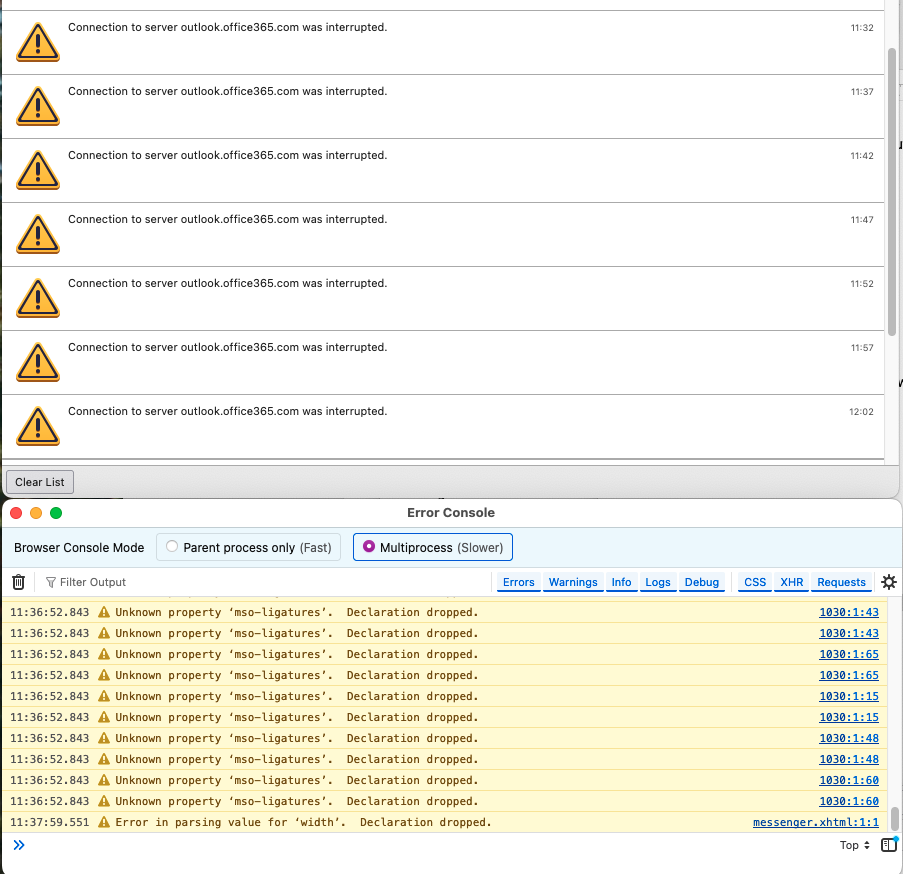
I opened Activity Manager and Error Console. Error console doesn't seem to have much (using 'Multiprocess', with Errors, Warnings, Logs, Debug enabled). Activity manager shows things such as:

<my account name>

   Connection to server outlook.office365.com was interrupted.    09:49
   Failed to connect to server outlook.office365.com.    09:52
   Authentication failure while connecting to server outlook.office365.com.    09:58
   Authentication failure while connecting to server outlook.office365.com.    10:03
   Connection to server outlook.office365.com was interrupted.    10:10
   Connection to server outlook.office365.com was interrupted.    10:14
   Connection to server outlook.office365.com was interrupted.    10:20

There was an error or log entry that I was able to find a few days ago that made me think it was Calendar related, but now I'm not finding that message.
This just started 4 or 5 days ago ( 2026.1.23 ish). I did not update TB nor make any changes to the account in question (that I'm aware of). The errors show up every few minutes, with a 'beep' sound and notification pop-up showing up each time - is very annoying. I was running v145 when it started. I saw there was an update to 147 and installed that; same issue. I restarted TB into Troubleshooting mode and am still getting the error. This is running on MacOS 15.7.3. Hardware is MacMini (2024) with Apple M4 chip. Generally I still seem able to received & send emails. I opened Activity Manager and Error Console. Error console doesn't seem to have much (using 'Multiprocess', with Errors, Warnings, Logs, Debug enabled). Activity manager shows things such as: <my account name> Connection to server outlook.office365.com was interrupted. 09:49 Failed to connect to server outlook.office365.com. 09:52 Authentication failure while connecting to server outlook.office365.com. 09:58 Authentication failure while connecting to server outlook.office365.com. 10:03 Connection to server outlook.office365.com was interrupted. 10:10 Connection to server outlook.office365.com was interrupted. 10:14 Connection to server outlook.office365.com was interrupted. 10:20 There was an error or log entry that I was able to find a few days ago that made me think it was Calendar related, but now I'm not finding that message.

所有回复 (1)

Errors continue, with TBird 147.0.1.

It happens at 5 minute intervals.

我要提问

您需要登录才能回复。如果您还没账号,可以提出新问题