


Thunderbird "could not connect to server" error

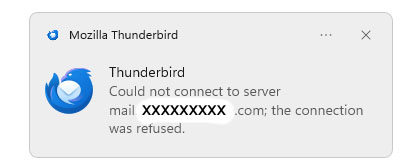
Thunderbird is reporting error "could not connect to server . . . the connection was refused." However, it seems that it reports this error only when there is no new incoming message. And it does not happen consistently.
Thunderbird is version 147.0. Operating system is the current version of Windows 11 on an HP desktop workstation, new 4 months ago.
I have 4 email accounts set up in Thunderbird. Server settings for the accounts are set to check for new messages at startup and at intervals of 5 to 10 minutes depending on the account and to automatically download new messages. I have confirmed the server settings for the accounts match the settings specified by the ISP. When there is a new message to be downloaded it seems that it does, in fact, connect automatically to the server and download when Thunderbird does its check for new messages at startup or specified intervals.
When I have open the Inbox for an account and click on the "Get Messages" icon or right-click on the account name and then click on "Get Messages" I usually promptly see at the bottom of the window the messages "Host contacted . . . sending login information . . . Checking inbox for new messages . . . there are no new messages to download." That is true even if I do that within seconds of receiving the "could not connect" error. But sometimes there is a delay of many seconds before the "host contacted . . ." message, and occasionally I never get that response to the click to get messages. When I click to "get messages" I never see the "could not connect" error even if the "host contacted" message does not appear.
I have set to show an alert and play a sound when new messages arrive. The same sound is played when the "could not connect to server . . ." error is displayed. The result is the sound may be played every 5-10 minutes. I can tell that this issue does not happen consistently because I might go for several hours, or even all day, without the sound and without the error message. The occurrence or absence of the error seems to be completely random and unrelated to what I may have open on the computer.
Since I do seem to be receiving messages without a delay in delivery this is perhaps no more than an annoyance, but I would prefer to avoid the annoyance. This is not happening on other computers here which are using Thunderbird.
所有回复 (2)
It's possible you are trying to connect too frequently. If you are getting auto connects that frequently then is there a reason you keep clicking on 'Get Messages' ? I only use 'Get Messages' if I'm expecting something urgently or performing a load of tests. Otherwise my auto check uses anything between 10mins and 30mins. All set for different times with odd minutes as well so the odds on a clash are minimal.
it's also possible you have an Anti-Virus which keeps scanning any file that gets opened which interupts the connection. You could access your Anti-Virus and set it up to not scan your 'Thunderbird' profile folder.
Start by setting the auto check to different times for each account. I'm not sure how many emails you expect to get in less than 10 minutes. Many servers do use Push if IDLE is available, so you would get a notification. eg: 10 mins 13 mins 16 mins 21 mins 29 mins
Thank you. I have changed server settings to longer intervals for the accounts that receive less urgent emails and will see if that makes a difference. But this remains perplexing since all indications are that the error message and alert are displayed only when there is no new incoming email to download, and every new incoming email actually does seem come in without delay, and this does not happen all, or even most, times set to check for new emails. As I said, perhaps only annoying and not a critical issue.