


Video DownloadHelper icon on the Firefox toolbar

Hello I have Firefox 144.0 (64-bit) installed. I added Video DownloadHelper to Firefox, but its icon doesn't appear in the Firefox toolbar. I've tried using Toolbar Customization, but the Video DownloadHelper icon doesn't appear there either, so I can't drag it to the toolbar. Can you help me put the Video DownloadHelper icon on the Firefox toolbar? Thank you
所有回复 (13)
Hi
Do you see it if you select the jigsaw puzzle piece icon on the toolbar?
Paul Excuse my ignorance but I don't know what the jigsaw puzzle piece icon on the Taskbar is.
This support article should help:
Paul When I select the jigsaw puzzle piece icon on the toolbar, the Video DownloadHelper appears in the Extensions list (to Disable, Remove, Report and Manage), but I don't know how to put the icon on the Toolbar Can you help me?
Hi, the article has the steps to pin an extension button to the toolbar. One way is to click the gear button on the row for the one you want to pin.
Hey jscher2000 I'm not very experienced in this area, and I can't install the Video DownloadHelper icon on the toolbar using the link provided. A while ago, on the page https://addons.mozilla.org/en-US/firefox/addon/video-downloadhelper/?utm_source=dhweb, when adding Video DownloadHelper to Firefox, before the installation was complete, there was a step where a box appeared allowing me to select whether to send the icon to the toolbar. Now, this step doesn't appear, and I can't put the icon on the toolbar, and therefore, I can't use Video DownloadHelper (I don't know if it can be used without the icon).
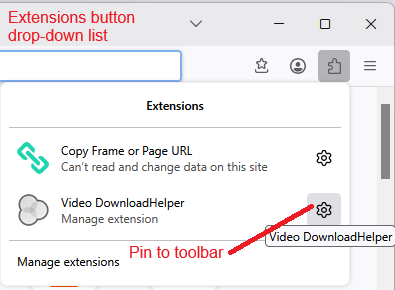
The idea behind the extensions button drop-down is that you can keep infrequently used buttons there and just click them on the drop-down instead of having them take up space on the toolbar. Does the button work if you click it on the drop-down?
Actually, are you getting a drop-down list from the extensions button, or is Firefox sending you to the Add-ons page? If Firefox is sending you to the Add-ons page, this can indicate that you are using a private window and the extension isn't allowed in private windows. Please check the following article for more information on how to fix that:
Hello jscher2000 Thanks for your answer. When I click the extensions button I go to a drop-down list and the Video DownloadHelper is the first item in the list and the private window isn't allowed. But, I still don't know how to put the Video DownloadHelper icon on the Toolbar.
Normally, if extensions are available in the current window, they show up on a drop-down list. For example, this is from a "regular" (non-private) window:
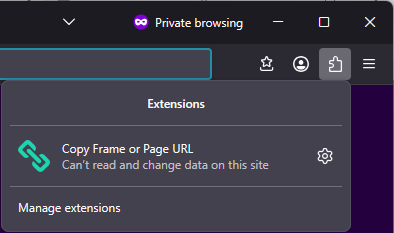
If it's a private window, the extensions that haven't been allowed to run in private windows are hidden:
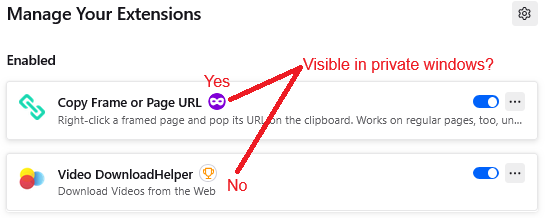
That permission is indicated with a mask icon on the Add-ons page:
If the mask icon is missing, click the extension name there to open its Details panel, scroll down and allow the extension run in private windows. Then check the Extensions button on the toolbar again -- or the rest of the toolbar if it was already pinned -- to see whether that button is now available.
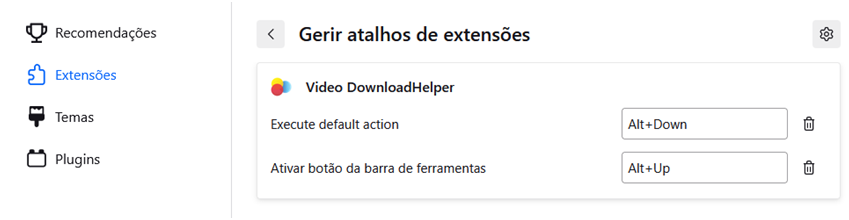
Hello jscher2000 Thanks for your answer and for your patience . When I access Extensions, it appears de fig. 1 (attached) Then I click te gear wheel and appears the fig 2 (attached)
Alt+Up is to “Activate button on Toolbar”, but nothing happens, the icon does not appear in the Toolbar.
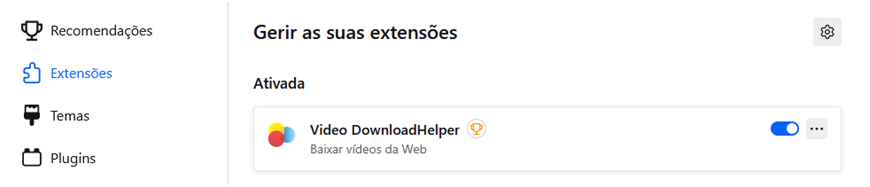
Could you go ahead and give permission to run in private windows?
Hello jscher2000 I give permission to run in private windows and everything remains the same. I give up. Thank you