


Card View and sent items moved to local folders - can't see the recipient?

I've recent moved to Linux and Thunderbird from Win/Outlook. I have a singifcant message base that I've successfully migrated to Thunderbird, most in bound email but witha chunck of outbound too. This all appears in Local Folders, with the outbpund stuff in Sent Item sub-folders.
Card View suits my well, however when I look at the Sent Items local folders, I always see the from address (i.e. me) rather than to "to" address. This is pretty useless, however I can't see any way to influence if it shopuld the from or to address in Card View with local folders. Am I missing something?
Card View within a 'normal' email account shows either to or from as you'd expect, and therfore works fine.
Thank you.
所有回复 (4)
PS. Current on 128.14.0
What do you see when using Table View ? Is the 'Recipient' column header displaying ?
re :with the outbpund stuff in Sent Item sub-folders.
In 'Local Folders' special account
When you send an email or 'Reply to an email which was in 'Local Folders' by default it creates a 'Sent' folder not 'Sent Items' and 'Sent' would be a top level folder not a sub folder.
I'm thinking out a load here...... It sounds like you are not using default 'Sent', so Thunderbird thinks the 'Sent Items' subfolder is a normal folder as opposed to a real 'Sent' folder. Hence using the normal settings for a normal folder displaing the FROM.
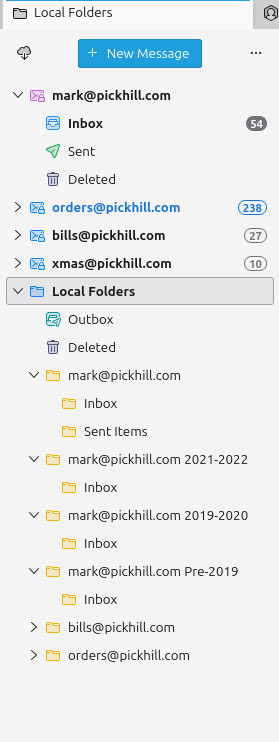
What icon is displayed to the left of the 'Sent Items' folder ? Is it just an icon of a folder ? Please upload an image showing the Folder Pane - the 'Local Folders' section so I can see what you see.
If my theory is correct then try the following and it should display correctly.
- Using an email currently located in the 'Local Folders' account, send/forward an email to yourself.
- This should create a 'Sent' folder in 'Local Folders' account.
- Then move emails from 'Sent Items' into 'Sent' folder.
Do those emails in the 'Sent' folder now display the Recipient ?
Thank you for your input Toad-Hall. Much appreciated.
In 'Local Folders' special account When you send an email or 'Reply to an email which was in 'Local Folders' by default it creates a 'Sent' folder not 'Sent Items' and 'Sent' would be a top level folder not a sub folder.
> I've forward a message in Local Folders and the sent mail item ends up in "Sent" in my default email account rather than anywhere in Local Folders. i.e. no Sent folder is created in Local Folders.
> The Sent Items was created by importing what I originally had in Outlook. I exported from Outlook to EML files using Mailstore Home then imported to TB using the import/export add-on.
> The Sent Items does indeed appear as any other folder (see attached image).
> Using Table View I can see the correct Recipient for all emails, therefore the underlying email items appear correct. It seems to be purely a display issue.
Try this as a temp trial - you can swap it back the account address later. In the Account Settings > Copies & Folders for the main account When sending messages..... Select 'Sent folder on' and choose 'Local Folders'
Then repeat the forwarding using an email that is in Local Folders.
Did that create the 'Sent' in 'Local Folders' ?