Transferring an name and email address from an excel file to an addess book in Thunderbird

I have an excel spread sheet with names and related email addresses. I would like to import the names and related email addresses into an address book in Thunderbird. I have set up a new address book to receive the import. I have saved the Excel file in CSV format. However when I import the data from my Excel spreadsheet the only data that transfer is the email address and not the associated name. How do I successfully import both the name and the associated email address?
所有回复 (1)
You have to align the fields in the import and in some cases select them to be included.
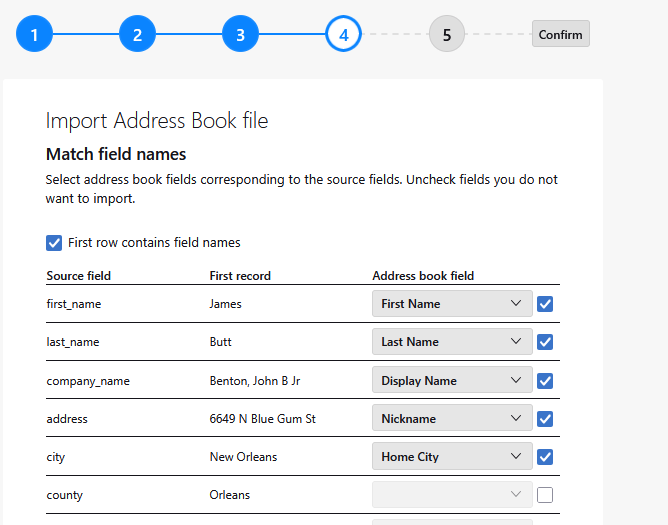
This image shows a CSV import to Thunderbird note the field names on the left which are the headings from the CSV file.
Thunderbird has taken that heading company_name and it intends to plonk it into the address book as Displyname. That would be unfortunate, so you have to correct the intended destination using the drop down arrows.
On the far right is a selector to include of not that field. so county is not going to be imported in this example. However if it is selected to import you get access to the same drop down lists of fields that it can be imported to (there is no county in Thunderbird so that one is a failure anyway. )
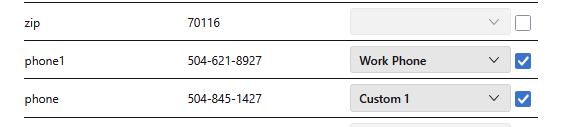
However you have to make decision at times about what goes where. My import has a phone1 and a phone, Thunderbird has a home and work number. Will they do? Can I allocate one as work and one as home ? Will you be needing to place one of those into a custom field and allocate it permanently as say phone1.