


Join us to show up for other Firefox users 🦊. Earn fun badges and Mozilla swag vouchers! Find out more: https://mzl.la/askafox150

Windows 10 reached EOS (end of support) on October 14, 2025. If you are on Windows 10, see this article.

搜索 | 用户支持

防范以用户支持为名的诈骗。我们绝对不会要求您拨打电话或发送短信,及提供任何个人信息。请使用“举报滥用”选项报告涉及违规的行为。

详细了解

How to 'Clear' or 'Delete' Private Tab entries/items in the History 'Recently Closed Tabs' field.

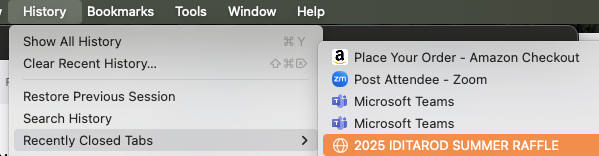
Firefox claims does NOT save site/URL visit information while in Private Mode. And I thought that was true. However, I just discovered that Firefox DOES SAVE Private Mode URL/Site visits - in this specific place. I don't know how long the history will be saved - it looks like at least as long as the Window is open. I want to keep most of my open Private Tabs open - but want to Delete/Clear the ones I'm done with. I thought/understood that Private window/tab/visit info was not tracked/saved - and it's not saved in History, or Searchable. But it appears that this doesn't apply to the Recently Closed Tabs MenuItem. And there seems to be NO 'delete' or 'clear' option for this field. I can't find any reference to the subject in the Forum or Articles. The picture I've attached is NOT of the Recently Closed Tabs while in Private Browsing, but is the same MenuItem and field contents. Thanks for your interest. I'm hoping someone can help me figure out how to delete/clear this specific history.
Firefox claims does NOT save site/URL visit information while in Private Mode. And I thought that was true. However, I just discovered that Firefox DOES SAVE Private Mode URL/Site visits - in this specific place. I don't know how long the history will be saved - it looks like at least as long as the Window is open. I want to keep most of my open Private Tabs open - but want to Delete/Clear the ones I'm done with. I thought/understood that Private window/tab/visit info was not tracked/saved - and it's not saved in History, or Searchable. But it appears that this doesn't apply to the Recently Closed Tabs MenuItem. And there seems to be NO 'delete' or 'clear' option for this field. I can't find any reference to the subject in the Forum or Articles. The picture I've attached is NOT of the Recently Closed Tabs while in Private Browsing, but is the same MenuItem and field contents. Thanks for your interest. I'm hoping someone can help me figure out how to delete/clear this specific history.
已附加屏幕截图

被采纳的解决方案

Currently open private windows share a Recently Closed Tabs list among themselves, separate from the list for non-private windows. I don't know whether that can be turned off.

When a private window is closed, its closed tabs are removed from the shared list, so closing the last private window clears the list. This also dumps the cookie jar shared among your private windows.

If you never reopen closed tabs in either private or regular windows, you could try setting the number of closed tabs saved to 0. I have not tested it myself, but this is where you can find that setting:

(1) In a new tab, type or paste about:config in the address bar and press Enter/Return. Click the button accepting the risk.

More info on about:config: Configuration Editor for Firefox. The moderators would like us to remind you that changes made through this back door aren't fully supported and aren't guaranteed to continue working in the future.

(2) In the search box in the page, type or paste browser.sessionstore.max_tabs_undo and pause while the list is filtered

(3) Double-click the preference to display an editing field, and change the value to 0 then press Enter or click the blue check mark button to save the change.

定位到答案原位置 👍 1

所有回复 (1)

选择的解决方案

Currently open private windows share a Recently Closed Tabs list among themselves, separate from the list for non-private windows. I don't know whether that can be turned off.

When a private window is closed, its closed tabs are removed from the shared list, so closing the last private window clears the list. This also dumps the cookie jar shared among your private windows.

If you never reopen closed tabs in either private or regular windows, you could try setting the number of closed tabs saved to 0. I have not tested it myself, but this is where you can find that setting:

(1) In a new tab, type or paste about:config in the address bar and press Enter/Return. Click the button accepting the risk.

More info on about:config: Configuration Editor for Firefox. The moderators would like us to remind you that changes made through this back door aren't fully supported and aren't guaranteed to continue working in the future.

(2) In the search box in the page, type or paste browser.sessionstore.max_tabs_undo and pause while the list is filtered

(3) Double-click the preference to display an editing field, and change the value to 0 then press Enter or click the blue check mark button to save the change.