


Disable Drag-to-pin feature

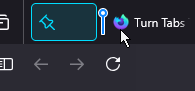
There's a feature that pins tabs if they're dragged to the left of the tab bar, shown in the image attached. Is there any way to disable this functionality? I can't seem to find any documentation on it whatsoever.
There's a feature that pins tabs if they're dragged to the left of the tab bar, shown in the image attached. Is there any way to disable this functionality? I can't seem to find any documentation on it whatsoever.
所有回复 (3)
This is a new feature and I don't think it can be disabled right now.

Hi lll_28_29 (lll_28_29),
I agree. This is terrible to force upon us users. Why not simply create a right-click option to pin INSTEAD OF forcing us to right-click to unpin?!
Mike.
I know this is not a great workaround, but if you want to move a tab to the start of the tab bar without the risk of dragging too far left, you can use this method:
- right-click the tab
- click Move Tab (or on Windows, you can type v)
- click Move to Start (or on Windows, you can type s)
由jscher2000 - Support Volunteer于修改