


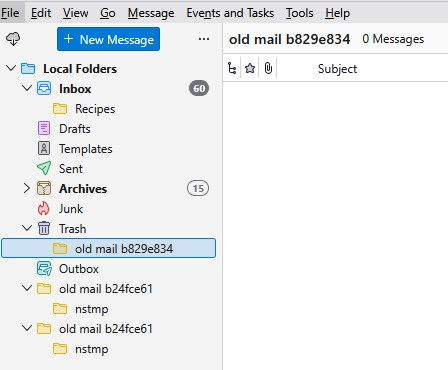
How to delete these "old mail" and "nstmp" folders?

We have these "old mail" and "nstmp" folders that will not delete.
right click on Empty Trash doesn't work, need to delete individual emails.
Windows 11
We have these "old mail" and "nstmp" folders that will not delete.
right click on Empty Trash doesn't work, need to delete individual emails.
Windows 11
所有回复 (1)
You can delete the files and folders using Windows File Explorer, while Thunderbird is shut down.
Go to Help > Troubleshooting Information > Profile Folder > click the button to the right to open Windows File Explorer at the profile location > find Mail\Local Folders.
You will find the files and folders there.