


XULRunner Error

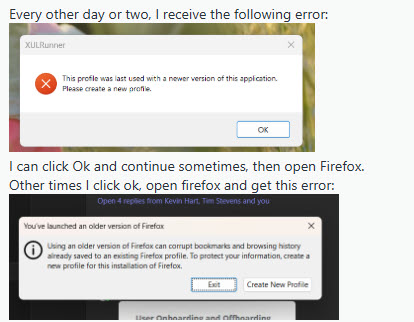
Every other day, I open FireFox and may get the following error: XULRunner - This profile was last used with a newer version of this application. Please create a new profile. Also, this error may come up while I already have had FireFox open for a while. Once this error comes up, I check the version, and sometimes the version is older than what it was, meaning, FireFox reverted back to an older version on it's own. I created a new profile, but the error comes back. I removed FireFox and all folders, and the error still comes back. There is nothing I can do to stop the error from showing up again. See attached images. I am on Windows 11 23H2, all windows updates caught up, and the current FireFox browser version is 138.03.
所有回复 (1)
Could you take a look at what Firefox thinks you were using before? Here's how:
Type or paste this shortcut path into the Windows search box, or the address bar of Windows File Explorer, then press Enter to submit it:
%APPDATA%\Mozilla\Firefox\Profiles
Each of the weirdly named folders here will have its own compatibility.ini file which lists the last-used version of Firefox. Do you see any anomalous results that might indicate a hidden installation of Firefox?