


Thunderbird Favorite Folders: Order?
Is there a way to sort Favorite folders? I've tried dragging them to a new order with horrible consequences. Instead of changing the order, the actual folder was moved to a sub-folder position within the actual folder I was trying to move to the position beneath it.
In other words, if I have Favorite folders: A, B, C, E, F, D and I want to move Folder D to the position after C and before E, dragging D to C will cause the physical location of the Folder D to be moved to a sub-folder position of Folder C in the email account.
If you then move it back to it's correct position AND folder D had sub-folders as well, you will then get the error message for any of Folder D's sub-folders: Unable to open the summary file for FOLDER D's SUBFOLDER NAME. Perhaps there was an error on disk, or the full path is too long.
BTW: is there a way to fix that error as well?
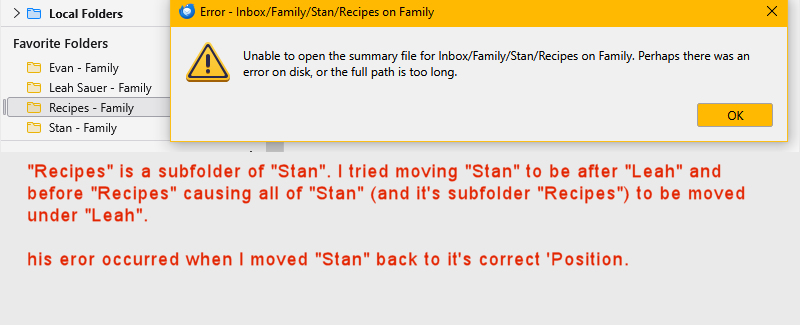
由NoahSUMO于修改
被采纳的解决方案
Ordering favorites is currently not possible.
定位到答案原位置 👍 1所有回复 (3)
I did find a solution to the error mentioned above, but not a solution to the ordering of the favorite folders.
To fix this error, unsubscribe and then resubscribe to the relevant folders. Give TB time to subscribe and, I presume, recreate the summary files.
选择的解决方案
Ordering favorites is currently not possible.

This is simple but the solution I have is to simply create folders with the prefix "A-(Name)". This works for a new folder. I supposed it also works if you can rename existing folders but I haven't tried it. Is this a good idea?