enumerateDevices() still doesn't work
Despite being listed as supported on: https://developer.mozilla.org/en-US/docs/Web/API/MediaDevices/enumerateDevices
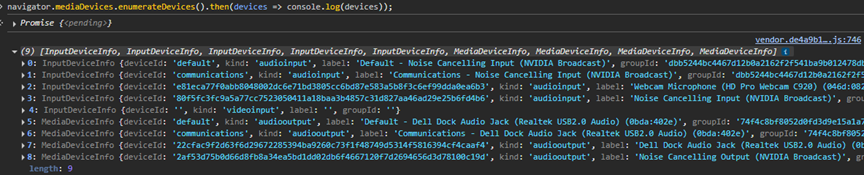
enumerateDevices() still only returns input devices. Running navigator.mediaDevices.enumerateDevices().then(devices => console.log(devices)); in the Firefox console only shows input devices while on Chrome it shows output devices.
I use a website that supports playing from multiple output devices so when receiving a phone call, your desktop speakers and your headset can ring at the same time. This works in Chrome but it doesn't in Firefox.

所有回复 (2)
Try to test it there -> https://jan-ivar.github.io/dummy/enumerate.html
Click Start both and then Enumerate devices.
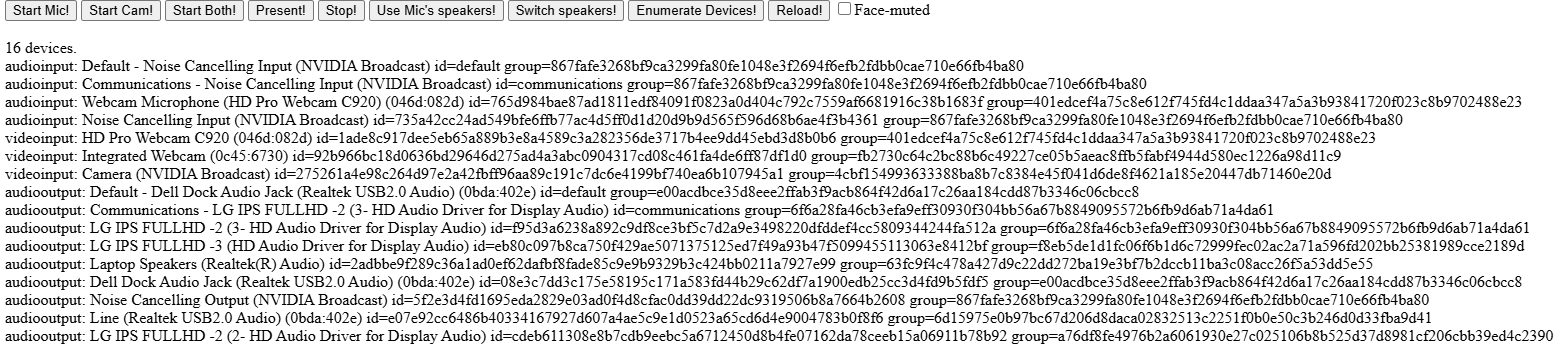
I've enabled some extra output devices and reopened both browsers. I've gone to the link and pressed Start Both! and then Enumerate Devices! and I've posted the screenshots below. With Firefox I get the default device and Nvidia Broadcast but on Chrome I get everything.