Import Export NG

I want to export a spreadsheet that has rows showing From: Date: Subject:
ImportExportTools NG Help shows: Message Index
   HTML Format 	Creates an HTML index file of the folder messages (no message export)
   CSV Format 	Creates a CSV index file of the folder messages (no message export)
Message Index -> CSV Format looks perfect for me.
This function does not appear anywhere I can find, either under Tools->ImportExportNG , or under the ImportExport top-level menu bar.
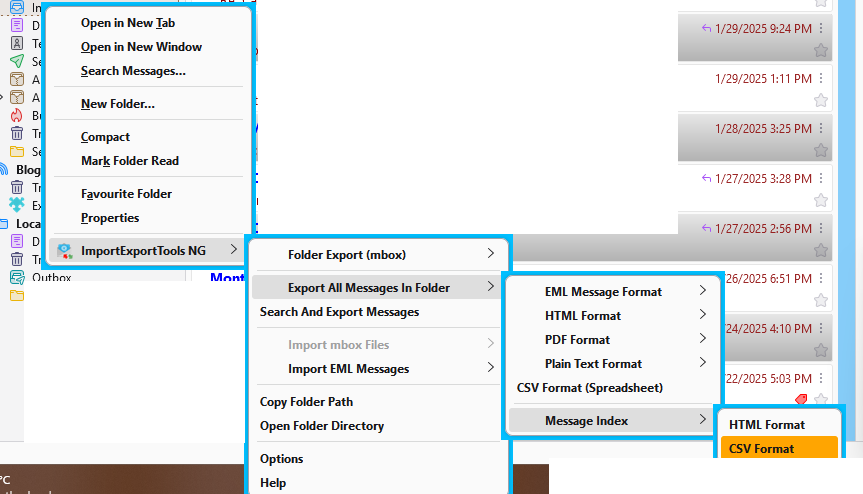
How do I find ImportExportTools NG->Message Index ?
Do I need to download another add-on??
I want to export a spreadsheet that has rows showing From: Date: Subject:
ImportExportTools NG Help shows:
Message Index
HTML Format Creates an HTML index file of the folder messages (no message export)
CSV Format Creates a CSV index file of the folder messages (no message export)
Message Index -> CSV Format looks perfect for me.
This function does not appear anywhere I can find, either under Tools->ImportExportNG ,
or under the ImportExport top-level menu bar.
How do I find ImportExportTools NG->Message Index ?
Do I need to download another add-on??
所有回复 (2)
There are many utilities to convert HTML to XLS - I don't believe there is a thunderbird feature or function to do that.
The attached picture shows the menu path accessible from the folder context menu.