


Cannot Delete Drafts

Good morning,
I cannot delete drafts in my draft folder. I have sent the emails, but they are still in the drafts folder.
Does anyone have a solution to this problem? I now have 22 emails in my drafts folder. When I delete them, they immediately re-appear.
TIA, Leslie
被采纳的解决方案
First, I would go to Plan B: log onto your online account and delete the drafts there, if present.
定位到答案原位置 👍 0所有回复 (17)
I presume you are using IMAP. Every x minutes, thunderbird saves a draft. when message is sent, thunderbird deletes its draft, but the IMAP folder retails all of the saved drafts. To avoid that, set your drafts folder to local storage and problem eliminated.
Will Thunderbird still save it until sent?
The problem only started about a week ago. Very strange.
I have no idea how to set my drafts folder to local storage.
The problem is that Thunderbird does not delete the draft. There is nothing in the local folder. Thunderbird won't let me delete them, as they show up immediately after it looks like they were deleted.
I have 4 email addresses and this is the only one in which it is happening.
First, it does delete the draft, but there is often more than one. To set to draft, do this: - click to account settings' - for your account, click 'copies&folders' - there click the option to save drafts to local folders
Thanks for your help. I do appreciate your time.
One more question~~~ Where do I move the drafts that still show? There are a lot.
Should the drafts that are still in the folder just be sent to trash to get rid of them?
I would simply highlight and delete. Trash will get rid of them for you. And... there are no bad questions. I am glad to assist.
The problem is that they won't delete.
Puzzling. This is an IMAP account, as I recall. Since it is a draft, maybe a more aggressive strategy is needed. Try this: - click help>troubleshootinginformation - scroll down left side to 'profile folder' and click 'open folder' - exit thunderbird - you are now in the profile. click the folder named imapmail - you should now see the name of the affected account. click it to display message folders - you should now see the various folders, one of which is draft (or drafts) and a matching msf file. DELETE both - restart thunderbird, if messages reappear, then we go to plan B.
Plan B is to log onto your online account and check the drafts folder and delete there.
Let me know how it goes.
Did you mean close Thunderbird? I didn't exit it, is that different?
Anyhow, l got to Profiles, opened IMAP, but all it lists are imap.gmail.com 1, imap.gmail.com 2 & imap.gmail.com-3, with matcing h msf. I have 4 gmail accounts, and don't know which one is which. Also, do I delete the entire folder, or just what is in it?
I meant to shut down the program so that it is no longer running. clicking the 'x' in upper right is fine. To see which account is which, click to account settings, and then highlight an account, and then click 'server settings' and look at bottom line. That will identify which folder is used for that account. Just delete the entry named 'draft' (or drafts) and the msf entry. If unsure, post a screenshot.
These entries?
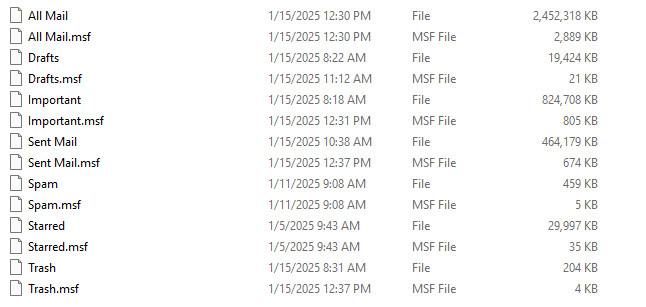
Yes, drafts and drafts.msf. I did not see inbox and inbox.msf. is that elsewhere? Please check. You can also check that by highlight the inbox on main pane for the account and rightclicking and selecting properties. Please let me know. Also, if you do NOT use the Allmail folder and the Important folder, you can reduce your profile size and improve performance of thunderbird by highlighting account on main pain, rightclicking and selecting 'subscribe' and then UNticking the boxes by Allmail and Important. Once done, exit thunderbird and delete the files for them. That will reduce computer resources in sending and receiving mail, plus make profile smaller and make compacting quicker.
Here is the Inbox. It is on another page.
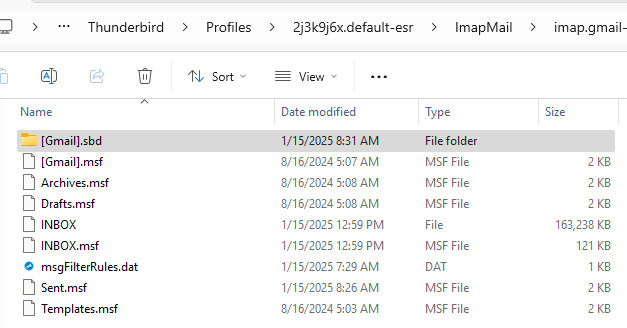
Thanks, let me know if the draft messages remain after the delete.
Deleted those 2 files. But the drafts are still there. Should I delete the msf that is on the inbox page?
选择的解决方案
First, I would go to Plan B: log onto your online account and delete the drafts there, if present.
Yay! Plan B worked!
Thank you so very much for hanging in with me. I appreciate your time and expertise.
You are very welcome. :) I was glad to assist. :)