


Thunderbird stopped working on a Mac

I use Thunderbird on a Mac. A couple weeks ago, it stopped working properly. It will download and display messages, but I can't forward, reply or send a new message. I thought I would uninstall and reinstall, but first want to export the address book. I can't do that either. Any suggestions on what happened and how to fix it?
被采纳的解决方案
I think the problem is the incompatibility between the Thunderbird address book and Mac "Contacts" in Sequoia, in contrary to earlier macOS versions. So one must block Thunderbird's access to Mac "Contacts": Open System Preferences > Security & Privacy > Privacy > Contacts and uncheck (disable) "Thunderbird".
定位到答案原位置 👍 0所有回复 (8)

Which is your macOS version and which is the Thunderbird version? What happens when you try to forward, reply or send a new message? Any error messages? Does TB freeze or get unresponsive?
The first and most simple diagnostic test to do is run TB in "troubleshooting mode" (formerly "safe mode") https://mzl.la/3AbU5jz http://kb.mozillazine.org/Safe_Mode
Mac is Sequoia 15.2. I can't tell you what version of Thunderbird I have. The menu is unresponsive when I click "About Thunderbird." If I try to forward or reply to a message, I get a blank screen - no text, no recipient or subject. I can enter a recipient and subject, but can't enter any text in the body of the message. The same thing happens with a new message - I'm unable to enter any text in the body of the message.
I can view the contacts in a side bar, but can't see any way to edit a contact in the address book. I've tried to use "Tools, Export", but it's not listed as an option.
No error messages are displayed.
I will try running in diagnostic mode, but I'm not sure what I'm looking for.
Thanks
选择的解决方案
I think the problem is the incompatibility between the Thunderbird address book and Mac "Contacts" in Sequoia, in contrary to earlier macOS versions. So one must block Thunderbird's access to Mac "Contacts": Open System Preferences > Security & Privacy > Privacy > Contacts and uncheck (disable) "Thunderbird".
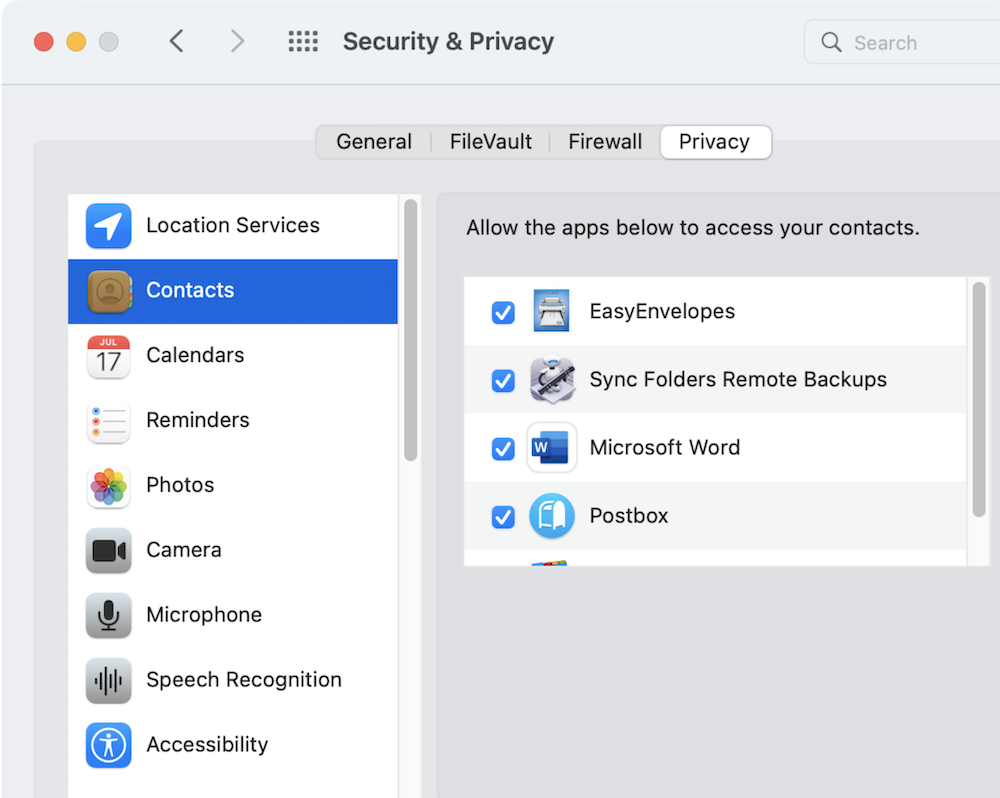
由Mapenzi于修改
I tried disabling access to Mac contents. That didn't fix the problems. However, getting into Safe Mode enabled me to back up the address book and reply/forward/send messages. When I quit Thunderbird and reopened, the problems seemed to be resolved.
Thanks for your help.

I tried everything mentioned and nothing has worked. I use this for work, so it's kind of a deal breaker. Any chance there's an addon that overcomes the problem? (I tried quickfilter, but that did nothing.)
I didn't ask you to "disable access to Mac contents" but disable access to Mac Contacts
BSmitty said
I tried everything mentioned and nothing has worked.
Please open a new thread and explain your problem

I give Thunderbird access to contacts on Sequoia, and do not have these problems. Thunderbird needs access to contacts.