


Side Bar change

I have just logged on for the day and the Side Bar has changed. It now has an extra layer making it wider which now pushes a highly used website page off the screen which is very annoying because I don't want to reduce it's zoom any more.
I use the Side Bar to bookmark various links within this website as shortcuts to navigate it.
How do I remove this unwanted extra layer?
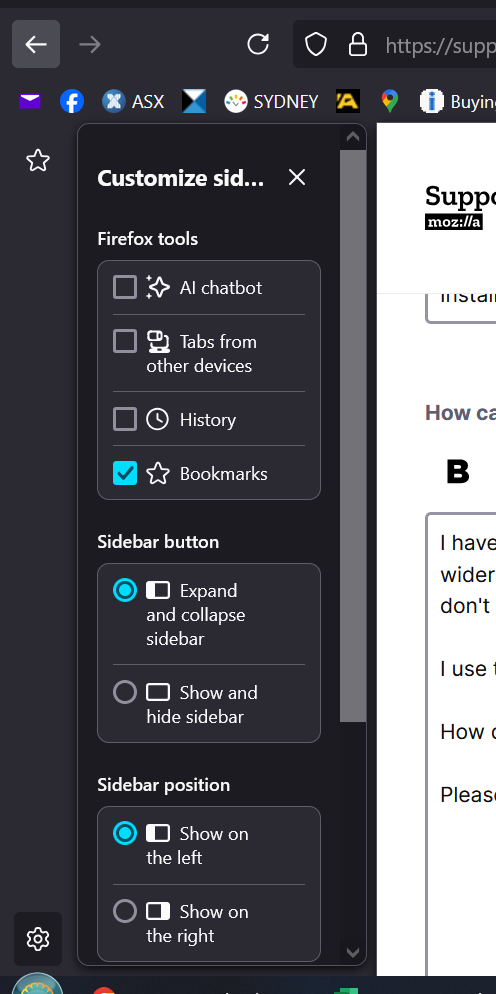
Please find attached a Snipping Tool file.
The unwanted extra layer is the bar down the left showing my Bookmark icon on the top and the Settings icon on the bottom neither of which I want or need and this is causing the extra width to the sidebar which is upsetting my viewing. How do I remove this new bar?
所有回复 (2)
Hi
Try selecting the "Show and hide sidebar" option shown in your image, that should help.
No that doesn't help at all. That only 'Shows and Hides' the Bookmarks I actually frequently use so don't want to hide them. It is the additional bar down the side as I said in my explanation. It wasn't there yesterday so I assume it's a new feature with no option to get rid of it. I really like the FireFox Sidebar (although it could still do with more options to customize it) particularly for use with a particular website though now with the added clutter and disruption of my website viewing I may start using WaterFox instead which I recently discovered.
由JahRay于修改