


Can't authenticate with Outlook.com's SMTP server. Requires Oauth but Thunderbird doesn't show this option in the drop down

Here's what I've done to try to resolve my issue: - Looked up this help article on support.mozilla.org - My precise problem matches "IMAP/POP3 work, but SMTP does not work" and it's for a personal account so I go visit this article on the hellish ever-changing landscape that is The Microsoft Knowledgebase - All of the server connection settings (address, port, TLS flavor) match - ... but Microsoft wants me to use either "Modern Auth / OAuth2" (other methods are being depreciated), neither of which seem to be available in Thunderbird. - This seems strange since the account itself is using Oauth for the IMAP connection. Why isn't it an option for SMTP? - I try to work around it by creating a new app password on my Microsoft account... - I still get an error telling me to enter a new password (with the checkbox to save in password manager)
由Twisted_Code于修改
所有回复 (8)
Are these your settings?
- incoming: outlook.office365.com, port 993, SSL/TLS, Oauth2 (assuming IMAP) - outgoing: smtp.office365.com, port 587, STARTTLS, Oauth2
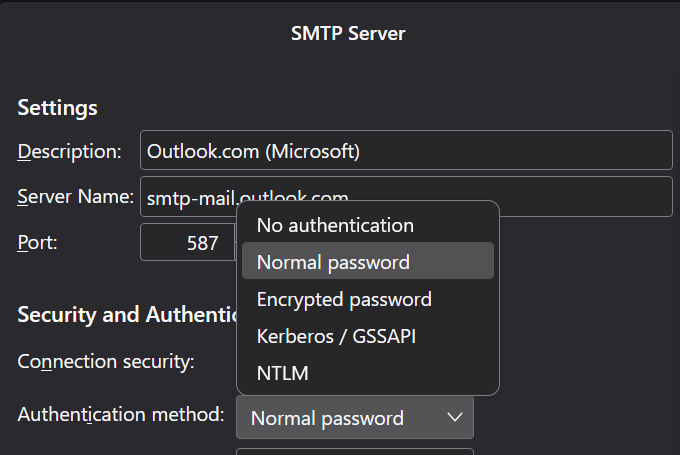
Oh did the screenshot not attach? I tried to attach a screenshot but got an error in the process; wasn't sure if it went through, but it shows my outgoing config (aside from username which I'd rather not leak; suffice to say username is something@outlook.com). Let me try attaching this screenshot again, I think the image might have been in the wrong format (I originally had it —mistakenly— as a bitmap, and after converting to PNG it looks like it attached without issue, so check below for that!)
But just for extra assurance regardless of the screenshot: incoming: outlook.office365.com:993 SSL/TLS, Oauth2 Outgoing: smtp-mail.outlook.com:587 STARTTLS, Normal password (as you'll see in the screenshot, there is no Oauth option. This is what confuses me most about my predicament, since) I'm not sure if the outgoing server should be smtp.outlook.com; the Microsoft article says it should be smtp-mail, but I suppose dropping the "-mail" is worth a try.
由Twisted_Code于修改
use the smtp server that I posted
I still get "Login to server with smtp.outlook.com with username <username> failed".
I specified smtp.office365.com try that.
Oh, whoops.... I assure you I know how to read LOL
But no, I still get "Login to server smtp.office365.com with username something@outlook.com failed." when attempting with my app password
Edit: wait, hold that thought, I see an Oauth2 option now when configuring the outgoing server. Where was this before?
由Twisted_Code于修改
My inference is that all is well. Oauth2 wasn't appearing previously because the server name was incorrect. At least, that's my view. :)
....nope. It started working for a time but has gone back to asking for my password (and then rejecting the App password) for some reason, even though I now have it set to Oauth2... it hasn't even popped up an oauth authorization window or anything
Edit: although, after restarting Thunderbird, it might be working again? Unless it consistently stops working and I can't get it working again by restarting, I'm probably back in business. I'm kinda suspicious still of the fact I haven't gotten an Oauth authorization window, but I suspect maybe it already has the authorization it needs from the authorization for the incoming server (I will, for the sake of my own convenience, ignore the fact these capabilities possibly out to be separate, because I don't feel like fighting Micros**t developers on it). If I mark this thread as solved, can I unmark it later if I have more issues that fit the original question? Even if not, I don't think I mind too much having to create a follow-up; just figure I should check before marking.
由Twisted_Code于修改