


Server name to amend... I cannot find it!

Hello I have been a Thunderbird user for decades now.
On one of my computer I have a 'misspelled' POP or IMAP server address error that pops up every time and it has become kind of annoying - I do not mean the SMTP server - that is easy to fix.
Since I keep a 'huge amount' of forwarders - i.e. aliases - I cannot go and check each one manually!
Is there a file within profile folder I can open with NotePad++ and amend error? Unless I missed something within the GUI and I do not need to amend a file directly. I am not into this part and I am asking you 'nerdy friends' (I am one for other things!).
Thanks for your time - appreciated and no rush.
Regards M
被采纳的解决方案
re :On one of my computer I have a 'misspelled' POP or IMAP server address error that pops up every time and it has become kind of annoying.
An image would help. But it should tell you the account name. Alias - do you mean you added them as additional 'identities' to a mail account that already existed ? In which case they would normally be using the same server settings as the original account, although you can choose another smtp if necessary.
Or are those 'alias' just additional email addresses which you have installed as a separate mail account?
The info below should help you to work out which account has incorrect server data as it provides all mail accounts in a list form making it a lot easier to check data than selecting each mail account in order to check it.
In Thunderbird
- Help > Troubleshooting Information
- At the top select the checkbox 'Include account names' - normally not required but in your case it could help you.
- Scroll down to 'Mail and News Accounts'
It will list all accounts. It will tell you the name of account usually email address and the server data. It should be easier to instantly check which one is wrong/spelling mistake etc as all are listed. This should then make it easier when you use 'Account Settings' > 'Server SEttings' for email address/mail account which has wrong incoming server data. Please note: Pop accounts cannot simply use imap server settings and vis versa.
定位到答案原位置 👍 0所有回复 (5)
选择的解决方案
re :On one of my computer I have a 'misspelled' POP or IMAP server address error that pops up every time and it has become kind of annoying.
An image would help. But it should tell you the account name. Alias - do you mean you added them as additional 'identities' to a mail account that already existed ? In which case they would normally be using the same server settings as the original account, although you can choose another smtp if necessary.
Or are those 'alias' just additional email addresses which you have installed as a separate mail account?
The info below should help you to work out which account has incorrect server data as it provides all mail accounts in a list form making it a lot easier to check data than selecting each mail account in order to check it.
In Thunderbird
- Help > Troubleshooting Information
- At the top select the checkbox 'Include account names' - normally not required but in your case it could help you.
- Scroll down to 'Mail and News Accounts'
It will list all accounts. It will tell you the name of account usually email address and the server data. It should be easier to instantly check which one is wrong/spelling mistake etc as all are listed. This should then make it easier when you use 'Account Settings' > 'Server SEttings' for email address/mail account which has wrong incoming server data. Please note: Pop accounts cannot simply use imap server settings and vis versa.
Hi Thanks for taking the time.
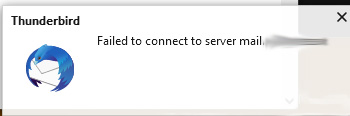
See attached image.
It is not a big problem, but it has become annoying, since I normally have other things to do, I still wish to take that off.
I did state some unneeded info, but I mainly have about 40 mailboxes and hundreds of forwarders through those mailboxes, most are pop, others are IMAP.
Maybe I was a bit cryptic, but I meant POP server in this case and yes of course IMAP and pop a separate entities.
The reason I am asking is that it does not show any info regarding which account is.
I wanted to know if I could eventually edit a file within profile, so next time it happens I know where to remove that line.
Thanks M
Toad-Hall said
In Thunderbird
- Help > Troubleshooting Information
- At the top select the checkbox 'Include account names' - normally not required but in your case it could help you.
- Scroll down to 'Mail and News Accounts'
@Mozzed Did you do that? I just read this thread and from what I can see you have replied as if you did not get information that would identify each and every server named in account settings and identify what account they are used in.
Hi Yep, exactly what I wanted.
It was impossible that here was no something similar like Firefox - silly me too!
Found in 3 seconds.
I am getting older I guess... really, I will retire in a couple of years and simplify our life... Maybe even Linux, since the ned for Microsoft is dimming by the second. 😂😂 There is a problem every day now with Windows.
Thank you very much and I hope it helps others. M
由Mozzed于修改
Quote: "Did you do that?"
Not initially ... I had my internet disconnected, so browser did not refresh. I usually do when I am doing other things and I have all protection off and I did not see message but only after I messaged.
Thanks again