

话题已存档。
如果需要帮助请提出新问题。

已存档
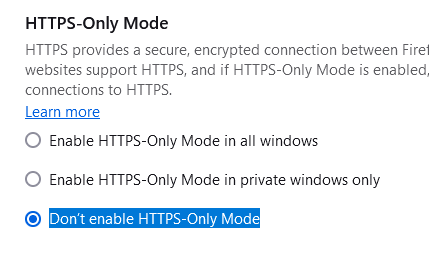
"Don’t enable HTTPS-Only Mode" is not honoured when enabled in settings

When I try to access an http:// site, the link is upgraded to https:// regardless of this setting.
This broke after a recent update to the browser. I cannot specifically say which upgrade, but it worked a month ago, now it doesn't anymore.
It may be worth noting that this broke in Brave (based on Chromium) at the same time.
When I try to access an http:// site, the link is upgraded to https:// regardless of this setting.
This broke after a recent update to the browser. I cannot specifically say which upgrade, but it worked a month ago, now it doesn't anymore.
It may be worth noting that this broke in Brave (based on Chromium) at the same time.
由Lifeboy于修改
所有回复 (1)
This is a bump, since I have not received any response on this issue! It's a major problem for us since we use Firefox for internal (not public) legacy sites that don't run on HTTPS