


How to make Firefox always show navigation buttons in context menu, also when right clicking an image?

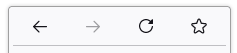
Is there any way to make Firefox show the "back", "forward", "reload", "bookmark" buttons that are shown in the default context menu when right clicking a web page also in the context menu that is shown when right clicking an image?
I think those buttons should always be included in all context menus opened for a web page, no matter if you happen to click on the background, on selected text, on an image or a link because.
It is so frustrating having to open the context menu multiple times to find a location where the default context menu is opened instead of the specific ones for selected texts, images, links etc.
Thanks!
选择的解决方案
zeroknight said
Paste the following into a text file and save it to <profile>/chrome/userChrome.css. Change toolkit.legacyUserProfileCustomizations.stylesheets to true in about:config then restart the browser. #context-navigation, #context-navigation > menuitem, #context-sep-navigation { display: flex; } #context-stop[disabled="true"] { display: none; } #context-reload:has(+ #context-stop:not([disabled])) { display: none; }
Thank you very much, this works perfectly!
所有回复 (4)
The context menu only shows items relevant to where you open the context menu, hence the name context menu, so you only get those buttons if you right-click in an area that doesn't have its own context menu (i.e. you get the standard menu). You can always click those buttons directly in the Navigation Toolbar or use the keyboard.
Paste the following into a text file and save it to <profile>/chrome/userChrome.css. Change toolkit.legacyUserProfileCustomizations.stylesheets to true in about:config then restart the browser.
#context-navigation,
#context-navigation > menuitem,
#context-sep-navigation {
  display: flex;
}
#context-stop[disabled="true"] {
  display: none;
}
#context-reload:has(+ #context-stop:not([disabled])) {
  display: none;
}
cor-el said
The context menu only shows items relevant to where you open the context menu, hence the name context menu, so you only get those buttons if you right-click in an area that doesn't have its own context menu (i.e. you get the standard menu). You can always click those buttons directly in the Navigation Toolbar or use the keyboard.
I argue that the browser page context menu should always show the actions relevant for the web page. If a link or image has been clicked, the menu should additionally show the more specific actions for the clicked entity.
选择的解决方案
zeroknight said
Paste the following into a text file and save it to <profile>/chrome/userChrome.css. Change toolkit.legacyUserProfileCustomizations.stylesheets to true in about:config then restart the browser. #context-navigation, #context-navigation > menuitem, #context-sep-navigation { display: flex; } #context-stop[disabled="true"] { display: none; } #context-reload:has(+ #context-stop:not([disabled])) { display: none; }
Thank you very much, this works perfectly!