


Check emails

I have 3 accounts set up with a unified inbox. When I click "Get Messages" at the top it only checks the first account. When I click "file", "Get New Messages For", "All accounts", it only checks the first account. I must go into that file menu and click each account separately to check all my emails. That's 3 times. Why will the check all accounts check all accounts? Thunderbird 115.6.1 (64-bit) Windows 11 Home Version 23H2 OS build 22631.3007
所有回复 (5)
Try this: highlight the unified inbox, rightclick, select properties and then click 'choose' to verify if all the accounts are ticked.
Not sure I am seeing what you may think. I have attached a screenshot.
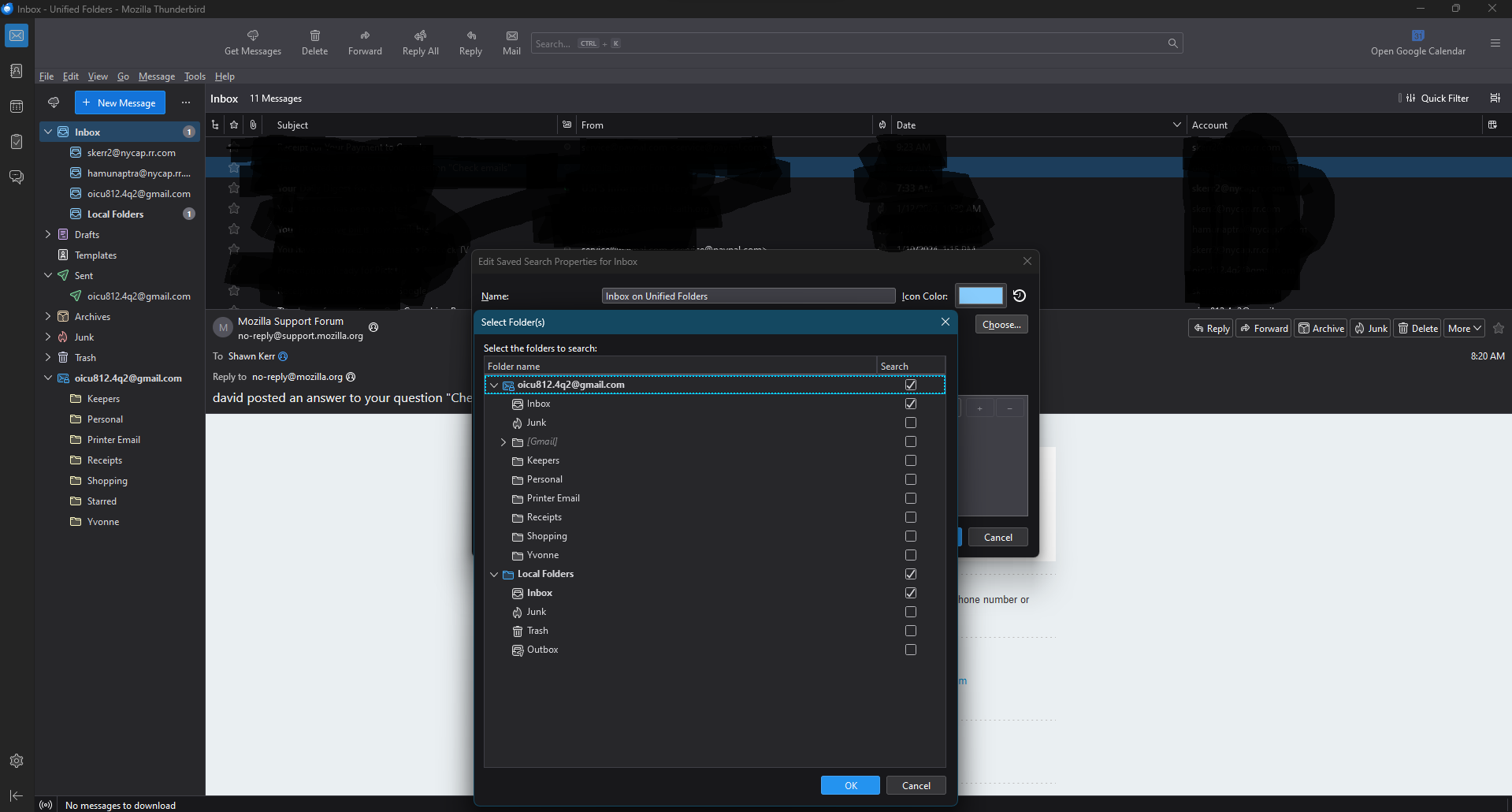
Okay, I agree, there's a problem. Try this: - exit thunderbird - in profile, go to Mail folder and you should see a fold called 'smart mailboxes' Delete it. - restart thunderbird. That should rebuild it and then recheck the previously suggested keystrokes to verify that all accounts are listed under the 'choose' button.
Deleted "smart mailboxes" twice, each with no success. The "choose" window shows the same thing.
Thanks for feedback. Maybe someone else here has ideas.