


Can't disable media keys - tried about:config with no avail

I can't get media keys to stop popping up, even though I've changed the media.hardwaremediakeys.enabled flag to false in about:config.
What do I need to do to turn this off? If I'm using a physical key on my keyboard to change the track, why would I need media controls to popup onscreen and stay in the way for several seconds?

所有回复 (5)
This is what I see (also Windows 10) -- is this the preference you are toggling between true and false:
(I'm a little puzzled about that thumbnail image. Looks like a Google search rather than the page for the embedded video. ??)
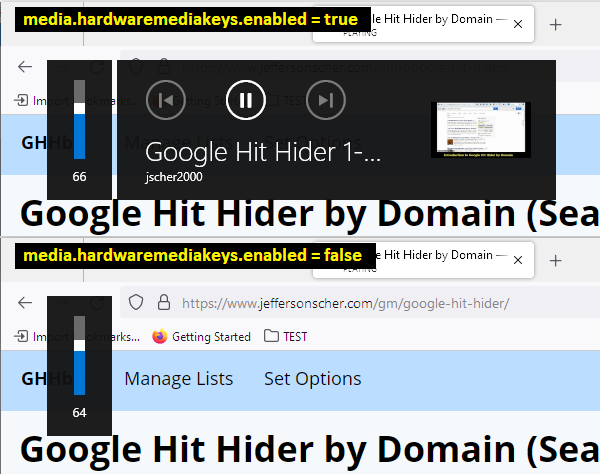
Oh wait, you are looking for a way to keep media keys enabled but suppress the overlay panel. I haven't heard of a way to do that, but perhaps someone else will have an idea.
Also: Mozilla has a product suggestion site at https://connect.mozilla.org/. I think if you have time, it would be a good idea to post this request there to get into the current feedback stream. Use the "Ideas" section of the site. You can share a link to your submission back here after it is posted by the moderators.
jscher2000 - Support Volunteer said
Oh wait, you are looking for a way to keep media keys enabled but suppress the overlay panel. I haven't heard of a way to do that, but perhaps someone else will have an idea.
I don't need or want Firefox to react to my keyboard media buttons inputs at all. I'm not interested in controlling playback in a tab, as I use a separate media player.
The fact that the overlay won't disable and blocks browser content for a lengthy period of time is really frustrating.
I don't know why setting media.hardwaremediakeys.enabled => false isn't working as designed for you.
Is it possible that another instance of Firefox is running in a separate profile where that preference is still set to true? Typically all windows of Firefox are merged on the Windows Taskbar, but you can separate them by profile as a quick way to spot whether this is occurring. Here's how:
(1) In a new tab, type or paste about:config in the address bar and press Enter/Return. Click the button accepting the risk.
More info on about:config: Configuration Editor for Firefox. The moderators would like us to remind you that changes made through this back door aren't fully supported and aren't guaranteed to continue working in the future. Since we have had this setting for a long time and I use it myself, I feel comfortable mentioning it.
(2) In the search box in the page, type or paste taskbar.grouping.useprofile and pause while the list is filtered
Firefox should display a bar with Boolean Number String and a "+" button
(3) Keep the selection on Boolean and click the "+" button. If Firefox doesn't automatically set the value to true, either double-click the value to switch it to true, or click the toggle button toward the end of the row.
That might not take effect until you have exited all Firefox windows, I can't remember since I set this up ages ago.
I tried the change you just mentioned above, but I'm still getting the media popup. I don't see any other profiles opening (which would make sense, since we don't use any other profiles). I guess I'll just live with it, but thanks for your effort.
由jmbootz于修改