


Subject column missing in UNIFIED View

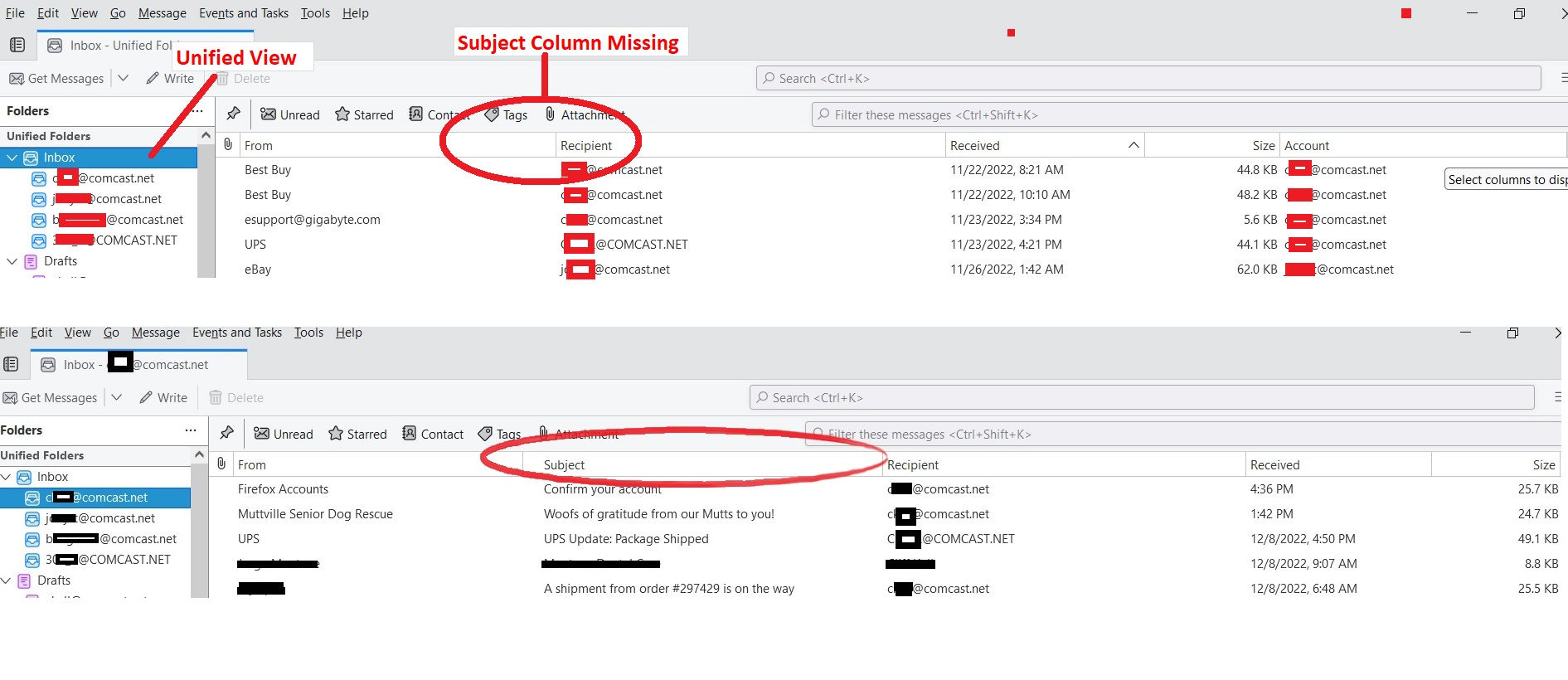
Sometime in the recent past (not sure exactly when), my SUBJECT column disappeared from the Unified View. See attached picture. View > Folders > Unified
Each individual email account correctly shows the Subject column, only the Unified view is missing the Subject column.
Clicking on the "Select Columns to Display" on the far right of the window and trying the "Apply columns to.." does not work because it does not provide an option to apply the columns to the UNIFIED view.
I tried reinstalling Thurnderbird but that did not fix the problem.
Any ideas how to fix this bug/program corruption?
所有回复 (1)
选择的解决方案
I found the fix, which I found after seeing the "See Also" threads shown on the right side of the screen.
The fix was to delete the "smart mailboxes" directory, as described here.
Use "Help -> Troubleshooting Information -> Open Folder" to display the contents of the profile using windows explorer (or whatever file manager you are using). Then exit Thunderbird and delete the "smart mailboxes" directory within the Mail directory. Start Thunderbird