


Incoming email is fine, but any email that I attempt to send to the comcast.smtp.net server fails.

Comcast is apparently changing their email security. They sent the following out:
"Reminder: Your email application or device may be out of date
We noticed you're accessing your Comcast.net email through an older email application or device, such as an older smartphone. Unfortunately, some older devices, operating systems, and email applications don't support current security protocols and therefore put your data at risk.
We rely on specific security protocols to help protect data in transit, including anything you send through your Comcast.net email. To help safeguard your data, we are discontinuing the use of older security protocols that have been deemed less safe.
We recommend updating your out-of-date email application or speaking with a trusted resource about your device and the software you use to access your Comcast.net email.
If your device or email application is not up-to-date before we discontinue these older security protocols, you will not be able to use it to access your email as you do today. However, you will still be able to access your Comcast.net email by logging into connect.xfinity.com through an internet browser. "
This appears to be based on them dropping support for TLS, v1.1 and lower.
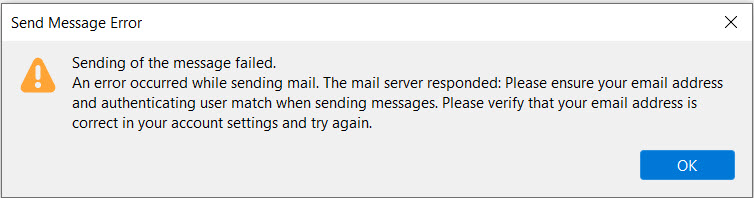
Currently I cannot send email, and can only receive. The error message that I get is shown in the attached picture file. This issue happens on my desktop system, and was confirmed by the same thing happening on my laptop.
被采纳的解决方案
I found the solution, from another support posting, "spontaneous changing SMPT server username". I named an SMPT server for each of my accounts, and all is well!!
What is strange is that everything had been working fine for years, without having to do that, until recently.
定位到答案原位置 👍 0所有回复 (3)
Oh, forgot to mention, yes, I am using the latest version of Thunderbird!
TB supports the latest TLS, so that isn't an issue. But if you have multiple accounts, make sure each one is sending through an smtp server that has a matching User Name. That appears to be the substance of the error.
选择的解决方案
I found the solution, from another support posting, "spontaneous changing SMPT server username". I named an SMPT server for each of my accounts, and all is well!!
What is strange is that everything had been working fine for years, without having to do that, until recently.
由umeweall1于修改