


Missing letters in text

102.4.1 (32-bit)
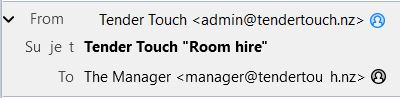
Ever since updating to this Thunderbird edition it has been missing letters in some text. Especially in the header and especially in the word 'Subject' (like this: Su je t)
102.4.1 (32-bit)
Ever since updating to this Thunderbird edition it has been missing letters in some text.
Especially in the header and especially in the word 'Subject' (like this: Su je t)
所有回复 (3)
Is it better in safe/troubleshoot mode? Hold Shift when launching TB.
Yes. In safe mode the problem disappears. All letters are there.
Start in normal mode and disable hardware acceleration in Settings/General (at the bottom), then restart in normal mode and see if the problem remains. If it does, launch in safe mode, 'Reset toolbars & controls', 'Make changes & restart'. If the problem remains, check for an incompatible extension or theme.