

话题已存档。
如果需要帮助请提出新问题。

已解决
已存档
Envelope icon displayed in subject field .. TB 78

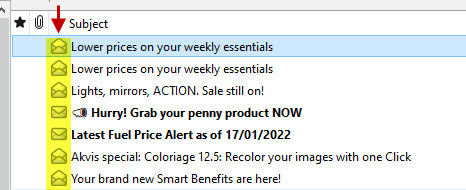
Since upgrading to v78 from v68 I now have an envelope icon being displayed in the subject line of the preview pane.
It appears to change depending on whether the email is read or unread.
Is there a way to remove it?
Since upgrading to v78 from v68 I now have an envelope icon being displayed in the subject line of the preview pane.
It appears to change depending on whether the email is read or unread.
Is there a way to remove it?
所有回复 (3)
Does it still occur if you update to the current release version? The normal thing to appear there is a yellow asterisk to signify unread mail you have not yet seen. What you have is not a image I am familiar with.
Hi Matt,
I upgraded to the latest R78 version yesterday 78.14.0 and that's when these envelopes appeared.
I just restarted in safe mode and they are not there, must be an add-on causing it I guess.
选择的解决方案
Sorted, it was Phoenity Icons causing the problem.