


Pinned tabs and keyboard shortcuts cmd + 0-9

Hey community!
Is there any way to make the cmd + 0-9 keyboard shortcut in Mac OS ignore pinned tabs?
Alternatively, for the shortcut ctrl + 0-9 to activate pinned tabs, and for the shortcut cmd + 0-9 unpinned tabs?
Thanks for the answers!
选择的解决方案
Okay, I have added this to: https://addons.mozilla.org/firefox/addon/switch-to-previous-active-tab/
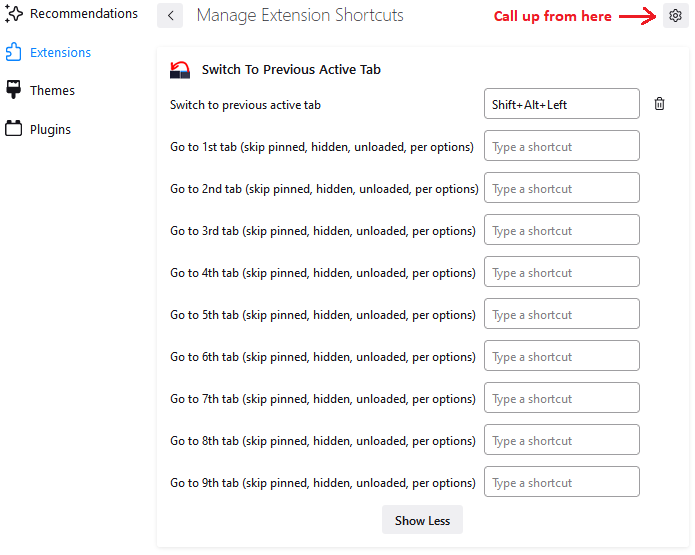
To assign the keyboard shortcuts you want, use the Add-ons page, "gear" menu, "Manage Extension Shortcuts" item (see attached screenshot).
To assign a key, click in the box and press the key you want to use. Firefox should inform you if you're not allowed to use it for some reason.
By default, it will skip the pinned tabs and any hidden tabs (some add-ons can hide tabs). You can adjust the settings on the Options screen (right-click the add-on's button and click Options).
If you give it a try, does it work for you?
所有回复 (4)
Not that I know of. On Windows "Ctrl + 1-9" is used and on Linux "Alt + 1-9", so control isn't available cross platform. It might be better to reserve the Shift modifier to reach unpinned tabs. Maybe file an enhancement bug report to investigate this feature.
Note that "Cmd + 1-8" is used to reach the first eight tabs and "Cmd + 9" to go to the last tab.
Yes I think that your idea is very good. Do you know how to achieve this in Firefox 95 on Mac OS?
If Ctrl+1 - Ctrl+8 doesn't do anything else on Firefox/Mac, an add-on could intercept them to activate non-pinned tabs.
I found two extensions that you can use to assign those keys, but neither of them has the option to skip pinned tabs:
- https://addons.mozilla.org/firefox/addon/ctrl-number-to-switch-tabs/
- https://addons.mozilla.org/en-US/firefox/addon/ctrl-tabs/
- To change from Command to Ctrl: Manage extension shortcuts in Firefox
Maybe I can add it to one of my add-ons. (Investigating...)
选择的解决方案
Okay, I have added this to: https://addons.mozilla.org/firefox/addon/switch-to-previous-active-tab/
To assign the keyboard shortcuts you want, use the Add-ons page, "gear" menu, "Manage Extension Shortcuts" item (see attached screenshot).
To assign a key, click in the box and press the key you want to use. Firefox should inform you if you're not allowed to use it for some reason.
By default, it will skip the pinned tabs and any hidden tabs (some add-ons can hide tabs). You can adjust the settings on the Options screen (right-click the add-on's button and click Options).
If you give it a try, does it work for you?