


Imap Email and Gmail 2 step authentication

I have 6 gmail accounts which until last Thursday were all working fine on Thunderbird. However, I received an email for my main account from google telling me that they were switching on 2 step authentication, whether I wanted it or not.
After that imap stopped working for this 1 account. So I logged out of google for this account, and logged in again, using 2 step via phone. Still not working.
So I checked all my Imap settings with googles instructions, updated from the default smtp server, and still nothing.
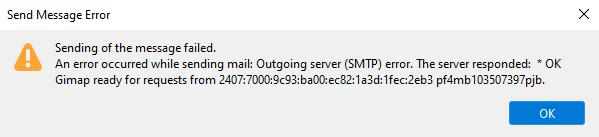
Went back to google, and found I could switch off 2 step verification which I did. Thunderbird now partially works. I can download emails but when I come to send or save as draft, I get the error message as shown.
Windows 10, Firefox 91.4.0 (64bit)
TYIA
所有回复 (3)
Oops forgot the image
change the authentication method in Thunderbird account settings, both in server settings for the account and in outgoing server (SMTP) to oAuth2.0 This will sidestep the entire two factor authentication debacle.
Two step authentication only works for web browsers. For mail clients you either need to create an app password (google document the process) or use oAuth. Hence my recommendation as it is less hassle going forward as Google promote oAuth as their preferred method.

I am having this problem as well. Have done the following:
- created an App password in the google account management. This did not work.
- oAuth2.0 is not listed as an authentication method in any of the account configuration screens in Thunderbird