


Can't disable Firefox login autofill

The settings for login and password autofill are checked but not available for me to disable. I don't want autofill enabled. How can I stop it? Thanks.
被采纳的解决方案
You're welcome.
定位到答案原位置 👍 0所有回复 (5)
Hi fred.alternative, what about the main setting, "Ask to save logins and passwords for websites"? If that is unchecked, then the items below it are grayed out and the password manager is disabled.
Could you compare your settings with this screenshot -- what's the same and what's different?

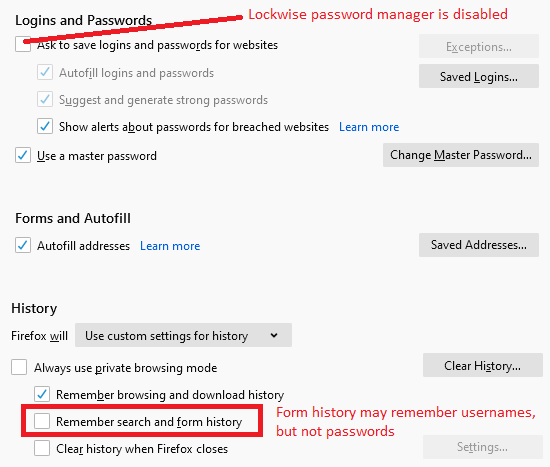
Hi, there are a number of differences with my settings. The first part of Logins and Passwords is the same (Ask to save logins and password for websites is unchecked) but I don't have Use a Master Password checked.
Forms And Autofill doesn't appear as a setting for me at all and History is set to Never Remember History.
Thanks, Steve.
If you are in permanent Private Browsing mode (Always use Private Browsing mode; Never Remember History) then you won't be prompted to save a new password and you won't be able to modify the "Ask to save logins and passwords for websites" and other login settings.
Note that you can still use "Fill Login" in the right-click context menu in a web form and use "Create a new login" in Lockwise in Private Browsing mode.
To modify the autofill setting you either need to start Firefox in regular mode of modify signon.autofillForms and possibly signon.autofillForms.http directly via the about:config page.
You can open the about:config page via the location/address bar. You can accept the warning and click "I accept the risk!" to continue.
That seems to have done the job. Thanks very much for your help.
Steve.
选择的解决方案
You're welcome.