Can't upload on Google Photos when using Firefox browser
I'm trying to upload photos on Google Photos (photos.google.com), but I always get an error message. I tried restarting my laptop, disabling add-ons, etc., nothing worked. I had to download Chrome again just to upload my photos. Please help, thank you.
由chaemi于修改
所有回复 (6)

What the error message exactly says is generally helpful in these situations. ;)
Please provide a screenshot of that error message.
See this support article. How do I create a screenshot of my problem? It is best to use a compressed image type like PNG or JPG to save the screenshot and make sure that you do not exceed a maximum file size of 1 MB.
Then use the Browse .... button below the Post a Reply text box to upload the screenshot.
I was able to upload 2/5 of the photos, but that took almost 30 minutes.
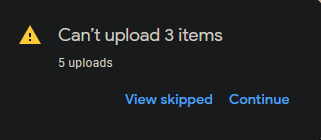
What security software do you have ?
It is possible that (anti-virus) security software is causing the problem. Try to disable security software temporarily to see if that makes a difference.
I have the same problem. My file sizes are small. (I compress.) My path names are short. I checked. I may or may not be able to upload one photo at a time but usually not. I never had any problem with this in the past. It still works fine with Internet Explorer, but I don't like to use that.
FF is broken re uploading photos to Google Albums. PLEASE FIX IT. I want it back the way it was.
I have the same problem on 2 computers in different versions of Firefox, 76 and 77 beta, with and without antivirus. Screenshot reads "Can't upload 14 files out of 164"