


FIREFOX CAN'T RUN WITHOUT "rlls64.dll" FILE?
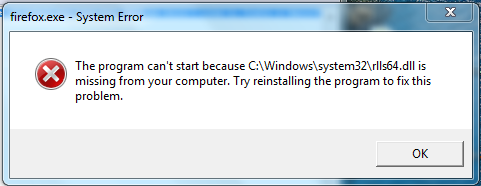
I just got virus protection (Webroot) for my computer. And it said that some file called "rlls64.dll" was a very dangerous file and it deleted it off from my computer, and I'm fine with that. Now when I open firefox it brings up this error: the program can't start because C:\Windows\system32\rlls64.dll is missing from your computer. Try reinstalling the program to fix this problem. I love firefox but it can't run without this virus file. Which one should I listen to, Firefox or Webroot?
选择的解决方案
Okay, I solved it. It wasn't Firefox that wanted to run that DLL it was relevant knowledge, it was modifying Firefox the whole time. Turns out it wasn't completely removed by webroot. I uninstalled it now Firefox runs just fine now.
So if anyone else has this problem just know to
- go to "C:\Program Files (x86)"
- permanently erase the folder called, "RelevantKnowledge"
and Firefox should be running just fine.
所有回复 (13)
I don't have that file (running Firefox 65 on Windows 10).
Could you try starting Firefox in its Safe Mode? In its Safe Mode, Firefox temporarily deactivates extensions, hardware acceleration, and some other advanced features to help you assess whether these are causing the problem.
If Firefox is not running: Hold down the Shift key when starting Firefox. (On Mac, hold down the option/alt key instead of the Shift key.)
If Firefox is running: You can restart Firefox in Safe Mode using either:
- "3-bar" menu button > "?" Help button > Restart with Add-ons Disabled
- (menu bar) Help menu > Restart with Add-ons Disabled
and OK the restart.
Both scenarios: A small dialog should appear. Click "Start in Safe Mode" (not Refresh).
Any improvement?
If Firefox still won't start, try:
Clean Reinstall
This takes about 5 minutes. It's not about your settings, it's about making sure the program files are clean (no inconsistent or alien code files). As described below, this process does not disturb your existing settings. It's not essential to uninstall Firefox, but you can if you like, saying No to any request about removing personal data.
It only takes a few minutes.
(A) Download a fresh installer for Firefox to a convenient location:
https://www.mozilla.org/firefox/all/
(B) Exit out of Firefox (if applicable).
If you use Microsoft Office, please change your default browser to Internet Explorer temporarily before the next step.
(C) Using Windows Explorer/My Computer (hold down the Windows key and press E to launch it), right-click > rename the program folder as follows (you might have one or both):
C:\Program Files (x86)\Mozilla Firefox =to=> C:\Program Files (x86)\OldFirefox
C:\Program Files\Mozilla Firefox =to=> C:\Program Files\OldFirefox
(D) Run the installer you downloaded in step (A). It should automatically connect to your existing settings.
Any improvement at your next startup?
Reinstalling a fresh one works for the first session. After exiting Firefox and starting a new session error pops up again :(
By the way I'm using windows 7.
由Computer于修改
Maybe there is some malware modifying Firefox. Did Webroot find anything else? Could you check with a few other cleaners: Troubleshoot Firefox issues caused by malware.
jscher2000 said
Did Webroot find anything else?
Yes, but I don't remember what the files were called. All I remember is that they were all "relevant knowledge" related.
Will Firefox start in its Safe Mode?
How do you open Firefox in safe mode?
Adam5 said
How do you open Firefox in safe mode?
If Firefox is not running: Hold down the Shift key when starting Firefox. (On Mac, hold down the option/alt key instead of the Shift key.)
If Firefox is running: You can restart Firefox in Safe Mode using either:
- "3-bar" menu button > "?" Help button > Restart with Add-ons Disabled
- (menu bar) Help menu > Restart with Add-ons Disabled
and OK the restart.
Both scenarios: A small dialog should appear. Click "Start in Safe Mode" (not Refresh).
Any improvement?
Nope, same error pops up... Firefox won't open up no matter what I do.
由Computer于修改
Webroot has removed everything "relevant knowledge" related from my computer (and I don't blame them), but Firefox wants all those files back. Is relevant knowledge mozilla related? I found their website and webroot does not like it.
No, Firefox doesn't require that DLL, something is modifying your Firefox after installation.
As I said
Reinstalling a fresh one works for the first session. After exiting Firefox and starting a new session error pops up again
I reinstalled it again and I am using Firefox right now, but I am not exiting because the error is going to show up until I reinstall it again.
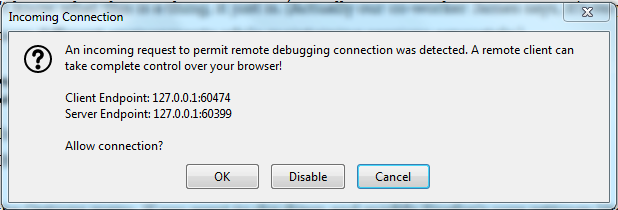
Anyway this error popped up:
由Computer于修改
Unless you set Firefox up for remote debugging, you shouldn't see that message.
选择的解决方案
Okay, I solved it. It wasn't Firefox that wanted to run that DLL it was relevant knowledge, it was modifying Firefox the whole time. Turns out it wasn't completely removed by webroot. I uninstalled it now Firefox runs just fine now.
So if anyone else has this problem just know to
- go to "C:\Program Files (x86)"
- permanently erase the folder called, "RelevantKnowledge"
and Firefox should be running just fine.