


Firefox 'internet shortcut' 'icon image' too small

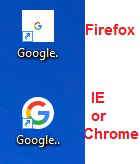
I've just switched to Firefox for the first time, and soon noticed that when I drag to create an internet shortcut with Firefox, to the Desktop, the resulting logo icon of the website is too small with a big white background.
I've searched for an hour trying to find the resolve to fix this oddity, and I see many others ask the same thing, but I've found no way to make it normal again.
For the life of me I don't understand why this has not been taken care of over the years by now - or perhaps it has, and if so would you please point me to the extension or whatever it is so that I can fix this.
I have made a screenshot showing exactly what I mean. The icon on top was created with Firefox by dragging from the browser URL to the Desktop, and the same on the bottom was made with IE, or Chrome, is normal and good, and it would be so nice to have Firefox be able to do the same thing please, and thank you!
edit: ..now of course I want the created icon to retain the icon logo of the website it's from, which has always been the normal way of things, imho anyway. (I randomly used Google as the site I was on, to create its shortcut)
edit 2 the next day: ..I've now installed Firefox on my Windows 10 box, and I can't believe it's the exact same thing with this small website icon image with a bigger white square around it. It's the same issue whether you have the shortcut on the desktop or in a folder. I've did some more research about this, and see it asked over and over again for the last 7 years, and I just can't believe that no one has created an extension, or whatever, to fix this arightly, for the people who like that when you drag an internet shortcut from the website you are visiting, that you want to keep each websites icon on the shortcut which the new firefox does that, but, also have it show Normal Size as shown in the bottom of my screenshot as IE and Chrome does it.
Is there a way?
由endeavorz于修改
所有回复 (1)
..and one more thing to mention please, I find it awkward at best in order to create a desktop icon, that I have to move the window over and drag from the URL box in order to make a shortcut.
Why can't it be like all the other browsers and just click a simple button to 'Send Shortcut to Desktop' ?
Thank you!