


How do I change the background and font color of the global search results pane?

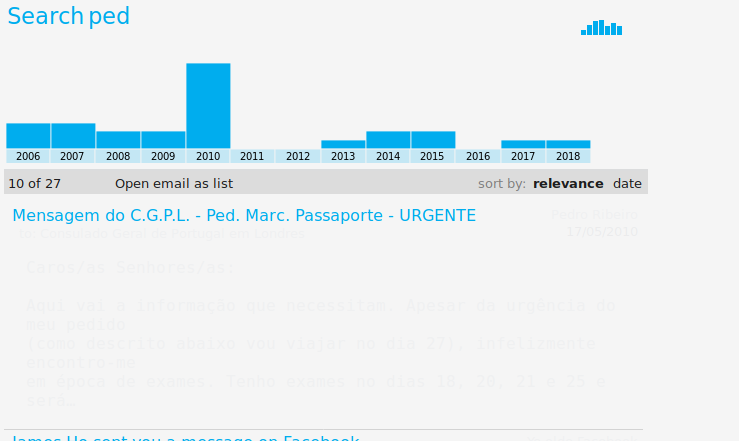
Hi, I'm using a dark GTK theme on Linux and when I search for messages using the Global Search, the results I get are unreadable as the font is white and the background also white (see attached screenshot).
Is there a way to change the font color, the background, or both? Preferably I'd like to change the background to black to match the rest of my GTK and Thunderbird themes, but if that's not possible I'd be happy with changing the font color to black so it becomes readable.
Hi, I'm using a dark GTK theme on Linux and when I search for messages using the Global Search, the results I get are unreadable as the font is white and the background also white (see attached screenshot).
Is there a way to change the font color, the background, or both? Preferably I'd like to change the background to black to match the rest of my GTK and Thunderbird themes, but if that's not possible I'd be happy with changing the font color to black so it becomes readable.
所有回复 (1)
Thanks, that works!