


DNS in HTTPS

Hi, Dear Firefox Support team. I'm currently using Firefox Nightly version 65.0a1. In the settings I selected enable DNS based on HTTPS and the address is default: https://mozilla.cloudflare-dns.com/dns-query And I can access to this cloudflare-dns website. but when I use wireshark, and browse Internet, I still find I'm doing DNS query each website, why is this happen? Doesn't the Firefox Nightly suppose to tunnel these traffic into https?
所有回复 (4)
Tried the guide, set the dns in firefox nightly as 1.1.1.1, still get dns query in wireshark.
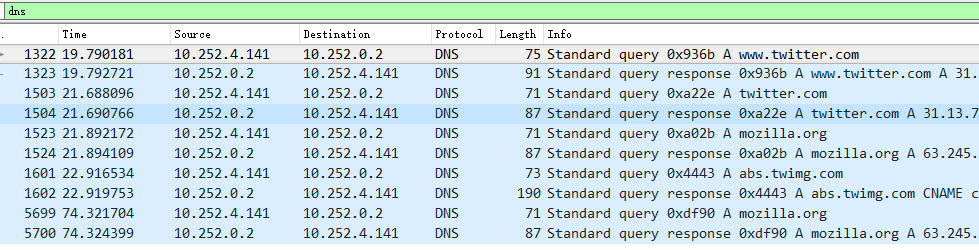
Try to ask at the Stack Overflow forum site, maybe someone over there know the answer.
What is happening is your have network.trr.mode set to 2 which allows Doh to default back to your operating system DNS.
You should be able to set network.trr.mode=3 so it only uses the Doh setting in firefox without defaulting to any other DNS. I could not get it to work. You have to restart Firefox I believe for it to take affect.