


Add Return Receipt icon to toolbar

I upgraded Thunderbird recently to 60.0, Somewhere along the line I lost an icon. When I was creating/responding to a message I had the "Return Receipt Requested" icon on a tool bar. It is now not there and I cannot customize the toolbar to add it back. How do I get it back on my toolbar. I know I can go to the Options menu item and add it from there but I would like to get it back on the toolbar? Thank you
所有回复 (4)
I don't understand what you want me to do. At one point(I don't remember when) when I customized the toolbar so that as I was creating a message I was able to add the "Return Receipt" icon to the toolbar. I could pick it from the menu option Options and drop it onto the place where I wanted it. I can't do that now. I have attached a screenshot of where the option I want is located. How do I add it next to Save?
Thank you
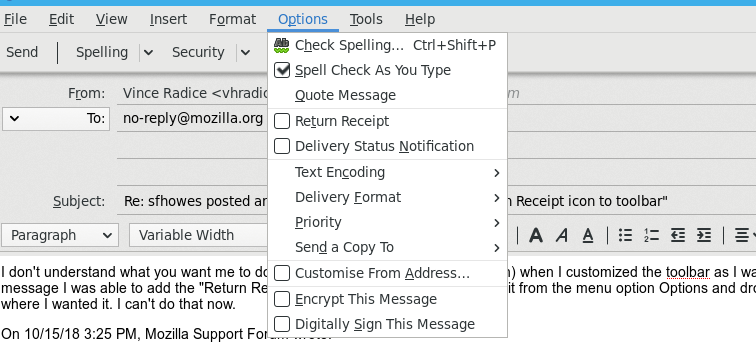

You can re-activate the add-on Return Receipt Button by setting the value (Menu-Tools-Options-Advanced-Config Editor) "extensions.strictCompatibility" to FALSE.
This procedure re-activates also the add-on RR BUTTON AND ICON (https://freeshell.de//~kaosmos/index-en.html#nrrh) which is also very helpful (Extension that adds an icon on headers panel, when the message had a return receipt request, this is helpful if you can not remember, if you asked for a RR).
Tested and worked in TB 60.5
I am running TB 60.4.0 on Frdora 28 64 bit. I just checked and 60.5 is not available through the Fedora update (dnf). I tried changing the Config entry to FALSE, restarted TB, and I still cannot add the addon. I downloaded the .xpi file but I cannot find a place within TB to install an addon from a file. Orwel, are you running windows by any chance? Has the install from file been implemented in the Linux version of TB? Also, the Menu-Tools-Options-Advanced-Config Editor is Menu-Edit-Preferences-Advanced-Config Editor in my version of TB.
Finally found the gear on the extensions menu. I was able to install the extension.