


Excessive numbers of tracking files

I am a recent user of Firefox and I have enabled No Tracking . There was an immediate improvement, with only a handful instead of thousands. This shows up when I disconnect and CCcleaner goes to work.
I have just added NordVPN and when I use it with Firefox I am now getting even more tracking files than I did using google for a similar time on the web doing nothing different than usual.
Does Nord disable No Tracking and why are there now more files than I ever got before? Is there something I don't know and how can all these files be stopped. I have checked and No Tracking is still ON.
被采纳的解决方案
Turning on "Do Not Track" adds a header to your requests to websites, which tell them you do not want to be tracked. However, it is up to the website to honor or not honor that, it is not a blocker.
定位到答案原位置 👍 1所有回复 (8)
What did you enable exactly? For example, "Tracking Protection", a feature which blocks certain content in pages; or "Do Not Track", a feature that signals sites that you don't want to be tracked (but doesn't block it); or something else.
I don't know why a VPN would affect what CCleaner is showing you. Can you ask on CCleaner's support channels?
Thanks for the quick reply.
I have opened the Tracking Protection box and have selected 'Always' on both the options. By doing that I was hoping that all attempts to track me would be blocked. I don't want to select any, just block the lot. Can you advise if there is anything else I can do ot what I have done wrong?
Regarding the Ccleaner It runs whenever I disconnect a browser or I can call it up any time. It gets rid of cookies, tracking files and other unwanted junk. Without Nord running I only got a handful if tracking files. With it running there are literally thousands more. All it does is clean what is actually what is there. I don't really see why Firefox is not blocking these files any more when it did at the start. I did not change any settings prior to noticing this. Hoping you can help.
Dorsetdrover said
Regarding the Ccleaner It runs whenever I disconnect a browser or I can call it up any time. It gets rid of cookies, tracking files and other unwanted junk.
The term "tracking files" is new to me. When I try to understand what that means from the Piriform forums, it goes in circles where potentially every file discovered by CCleaner is called a tracking file, such as cached files.
I think you should try asking over there and see whether you can get a straight answer, or ask the NordVPN people.
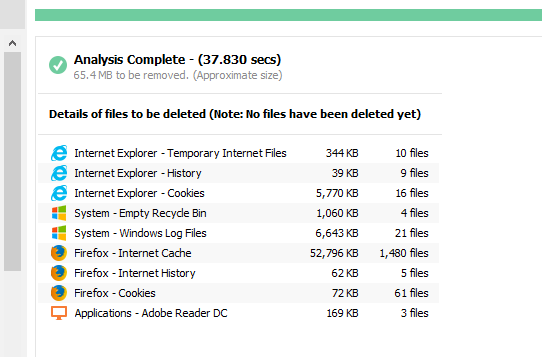
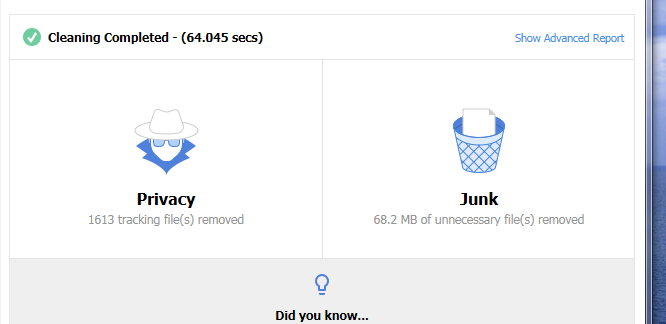
Hello again, By way of a test I have done similar things on the internet both with and without Nord. I am getting similar results with both, so I think we can eliminate Nord as the problem. Regarding Ccleaner it will eliminate anything it sees as a problem file. I will try and include a copy of what it is actually eliminating when I can find out how to do it, maybe a screen snip.
Here are the snips from Ccleaner before and after the cleaner has run.
Do you want Firefox to delete cached files, cookies, history entries, or other information when you close it? There is a feature for that.
Delete browsing, search and download history on Firefox (third topic)
Be careful to check the "Settings" button if you use "Clear History when Firefox closes" and do not clear "Site Preferences" if you create site-specific settings (for example, permission to show popup windows or use Flash).
Thanks for the help. Just one last question. If I have selected do not track, how is that hundreds of tracking file show up evey time I shut down?
选择的解决方案
Turning on "Do Not Track" adds a header to your requests to websites, which tell them you do not want to be tracked. However, it is up to the website to honor or not honor that, it is not a blocker.