


проблемы с закладками

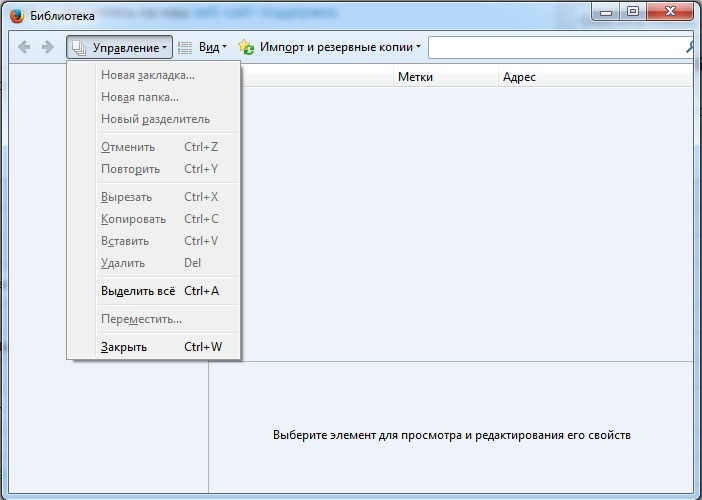
обновился с ff50 до ff56, а потом вернул назад (не понравилось), но при этом пропали все закладки и не восстанавливаются из html-файла. Так же оказались недоступны большинство действий из управления закладками.
选择的解决方案
Огромное спасибо! Удаление файла places.sqlite решило проблему с закладками! Ура!!!
Thank you so much! Removing the places.sqlite file solved the problem with bookmarks! Hooray!!!
所有回复 (4)
There were some changes to the Places database format around Firefox 56 that makes it incompatible with older versions of Firefox.
You might need to try the steps in this article -- trigger Firefox to generate a new database:
Fix "The bookmarks and history system will not be functional" error message
Also, why Firefox 50? If you want to use an older version, please use the "Extended Support Release" (ESR) version: Switch to Firefox Extended Support Release (ESR) for personal use.
On the download page, above the list of different languages, there is a selector on the right side to choose Firefox 60 or Firefox 52.
I did not see your earlier question https://support.mozilla.org/questions/1221981 but I would have the same suggestion.
If "Verify Integrity" on the "Help -> Troubleshooting Information" (about:support) page cannot repair places.sqlite then remove all places.sqlite files in the Firefox profile folder. Firefox will rebuild places.sqlite and restore the bookmarks from a recent JSON backup in the bookmarkbackups folder.
- keep a backup copy of places.sqlite in case a new places.sqlite database has to be created
- http://kb.mozillazine.org/Unable_to_process_the_backup_file_-_Firefox
You can use the button on the "Help -> Troubleshooting Information" (about:support) page to go to the current Firefox profile folder or use the about:profiles page.
- Help -> Troubleshooting Information -> Profile Directory:
Windows: Show Folder; Linux: Open Directory; Mac: Show in Finder - http://kb.mozillazine.org/Profile_folder_-_Firefox
See also:
选择的解决方案
Огромное спасибо! Удаление файла places.sqlite решило проблему с закладками! Ура!!!
Thank you so much! Removing the places.sqlite file solved the problem with bookmarks! Hooray!!!