


Lightning Attendee Invites doesn't send and some tabs don't activate

Similar to: https://support.mozilla.org/en-US/questions/1212271 but no Exchange add-on; this is pure TB using IMAP accounts.
Many of the previously asked questions on a Google search refer to very old versions of TB & Lightning.
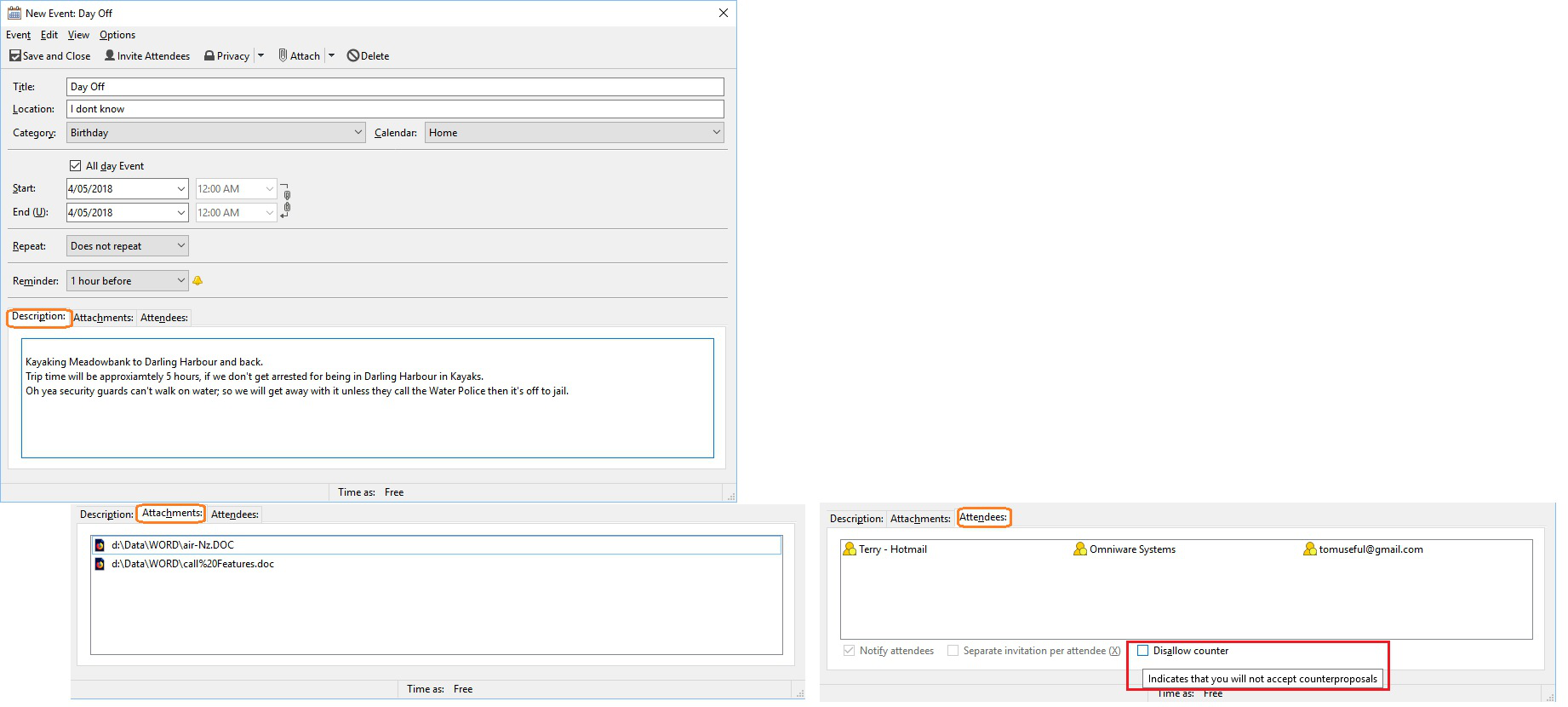
TB 52.7.0 / Lightning 5.4 / Windows 10 Pro / Standalone PC / Internet Access Active. Q1:: As per attachment create a new event with Invitees, with attachments. Click "Save and Close" - Event created in the calendar but no emails are sent to Invitees - why.
Q2:: I Bring up a event already in the calendar and wish advise staff of this event; setup all relevant fields. a. Why cant I click in the Notify Attendees to toggle the marker (tick) b. Why can't I click in the Separate invitations per attendee (X) c. Click "Save and Close" - Event created in the calendar but no emails are sent to Invitees
Thank you for reading
Terry
所有回复 (1)
Do you have an email address associated with the calendar to actually do any of this mailing. My guess is not.
Right click the calendar name in the list of calendars on the left of the calendar tab select properties. select an "email" from the drop down list.