

话题已存档。
如果需要帮助请提出新问题。

已存档
Setting an option for an e-mail address or distribution list that it can only appear on the Bcc: line?

It would be nice if you could set an option for a distribution list that it can *ONLY* appear on the Bcc: line, so you can't by mistake put it on the To: or Cc: line and make all the e-mail addresses visible to all recipients.
Is there an option/function/add-on that does this?
It would be nice if you could set an option for a distribution list that it can *ONLY* appear on the Bcc: line, so you can't by mistake put it on the To: or Cc: line and make all the e-mail addresses visible to all recipients.
Is there an option/function/add-on that does this?
由JBexter于修改
所有回复 (3)
Thanks, I think that's exactly what I need!
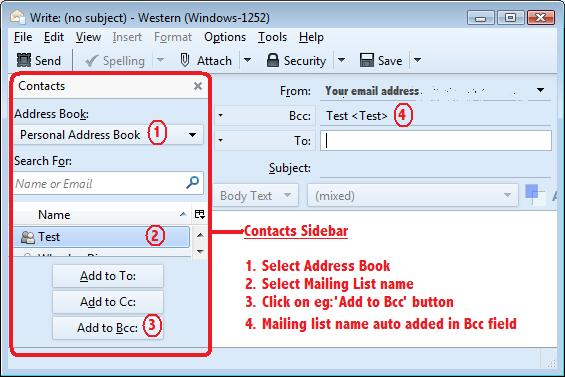
I have Contacts Sidebar enabled in Write window.
- Select Address Book
- select Mailing List name
- click on 'Add to Bcc' button.
see image:
I personally like the add-on better: using Contacts Sidebar requires extra mouseclicks and when in a hurry (these things always happen when you're in a hurry) you can still make a mistake. E.g. when you want to add an address on the "To:" list and by mistake you select a distribution list with practically the same name.