


Manually add notifications block?

http://www.tomshardware.com/ is annoyingly circumventing these block lists. I've notified them several times to no avail. Is it possible to get an extra feature to the block list to manually add sites to block?
所有回复 (6)
Hi !
You probably will have done this, but just in case you haven't :
When you're on that site, click on the little 'i' in a circle (next to the padlock at the left side of the address bar) Click on the little black arrow, then on ' More Information' => Permissions tab. Scroll dow to 'Receive Notifications' and uncheck it - then check 'Block'.
Noice, I guess that will work. If they manage to sneak more notifications through I'll be back! \o/
- D
Duckofdeath said
Nice, I guess that will work. If they manage to sneak more notifications through I'll be back! \o/
- D
Keeping my fingers crossed that you won't be back ...... :D
Oh noes! I'm back! That trick didn't work either. tomshardware is still circumventing the notifications block... :(
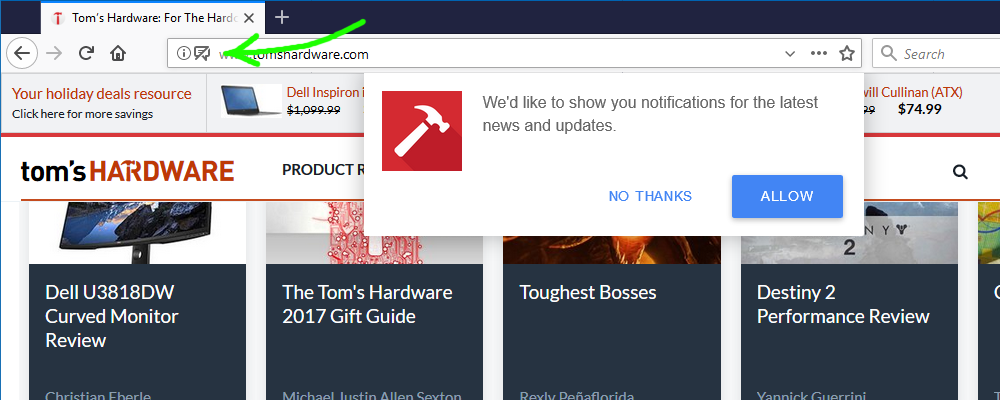
Did you check the Notification setting in "Tools -> Page Info -> Permissions" to make sure it is still block?
Yes I did. The arrow on the screenie in my previous post points at the "notifications blocked" icon while there is a pop up notification from the page. As you can see on the screenie, tom's hardware somehow manages to hide the option to block future notifications from their site. Other sites with these notification requests gives you the option to block/hide them.